
Rentals
Let it by the night
Take direct bookings for holiday lets, rooms and other nightly rentals through your existing shop. Guests choose their dates and pay in full or leave a deposit. Set seasonal rates and sync availability with other listing sites. Rentals requires Bookings: choose Rentals only for $149 if you already own it, or Bookings + Rentals for $249.
The demo is Saltmeadow, a beach house let by the night, running on Bookings + Rentals.
Version 1.0.8 Released
What your guests see
Make choosing dates easy
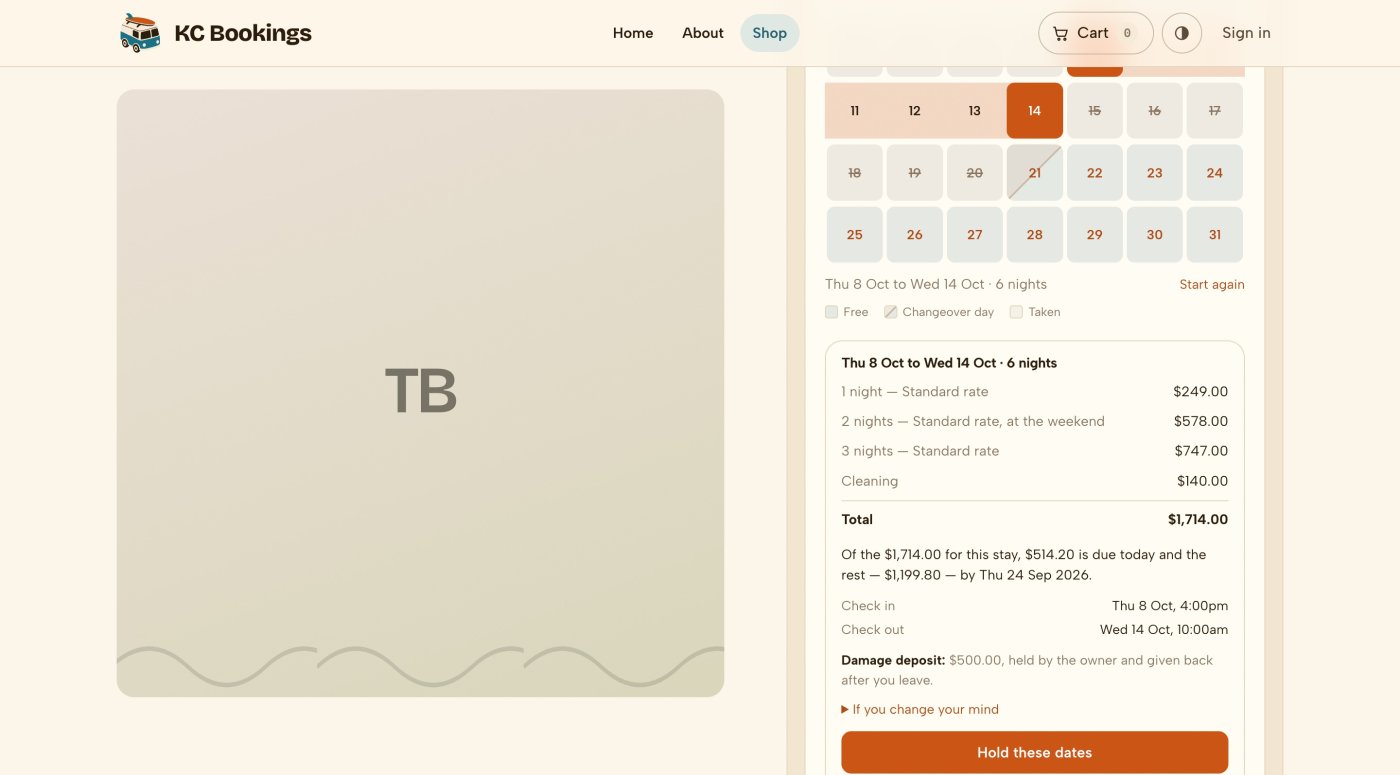
Guests select arrival and departure dates on a calendar that shows availability and changeover days. The selected stay appears as one band across the nights. The calendar displays two months when there is room, or one on smaller screens.
- Prices come from the shop’s pricing engine, which also supplies the checkout.
- Unavailable dates explain the restriction, such as a three-night minimum or Saturday arrivals.
- Hold these dates starts a countdown and reveals the product’s Add to cart button.
- Guests can navigate by keyboard. Screen readers announce date and price changes.
- Uses your product catalogue
- Set a product’s booking rule to Nightly stay. Its price becomes the nightly rate, with its name, images, category and tax class in the usual product editor.
- One cart line per stay
- The cart and receipt show the whole stay with its rate breakdown. Quantity controls are hidden because each stay needs its own dates.
- Availability on any page
- Embed a read-only calendar with a shortcode or Twig call. It uses the same availability data as the booking calendar.
- Fits your theme
- The picker uses your existing product form and colours. It shows one or two months according to the space available.
How you let it
Set the rules for each property
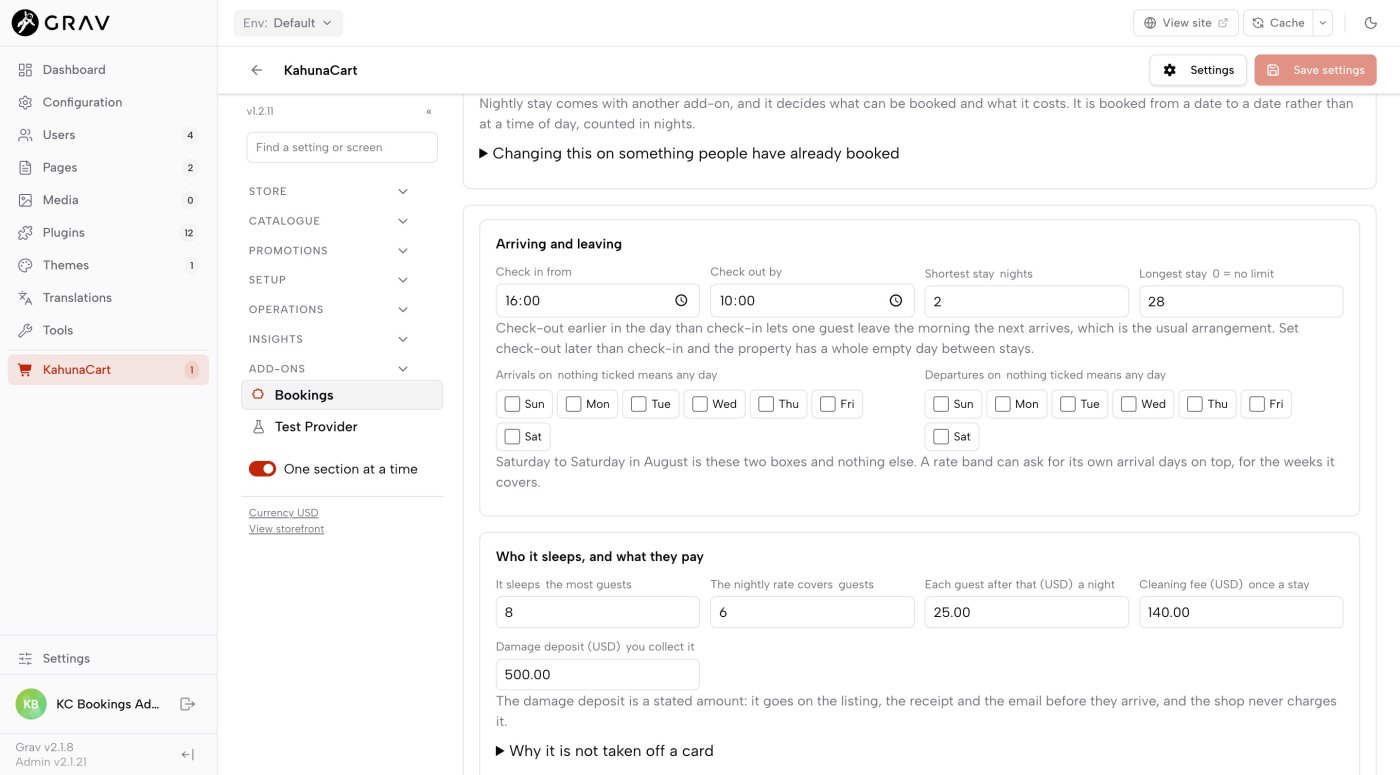
Set arrival and departure times, stay lengths, allowed weekdays and guest limits in one place. An earlier check-out than check-in allows same-day changeovers. A later check-out leaves an empty day between stays.
- Nights follow the property’s local dates, even if your shop is in another timezone.
- Set Saturday arrivals and departures with a seven-night minimum on an August rate band.
- Prevent bookings that would leave a gap shorter than your minimum stay. The refusal identifies the affected night.
- A week remains seven nights when the clocks change.
- Same-day changeovers
- Arrival and departure times let one stay end on the day another begins without overlapping bookings.
- Shared room capacity
- Manage four identical double rooms as one property with a capacity of four. Guests see how many rooms remain.
- Double-booking protection
- Stays use the same locking and availability rechecks as appointments, on SQLite, MariaDB and PostgreSQL.
- Reasons for unavailable dates
- The guest calendar, Troubleshoot screen and CLI explain restrictions such as existing bookings, imported busy dates and minimum stays.
What a night costs
Plan your seasonal rates
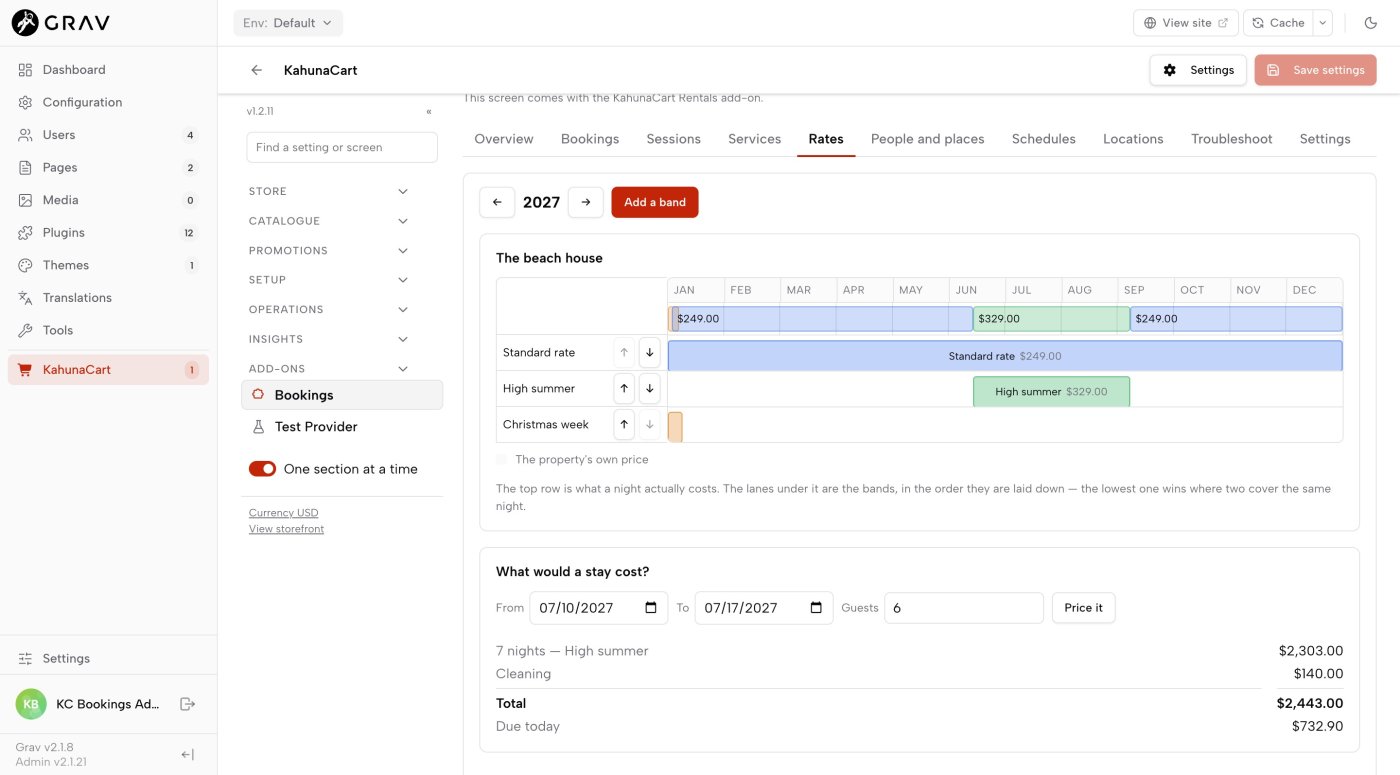
Use the product price as your standard nightly rate, then add dated bands for seasonal changes. Bands can overlap: Christmas week can sit within a winter season. The band lower in the list takes priority. The timeline shows the nightly price after those rules are applied.
- A band can set weekend prices, a minimum stay and allowed arrival days for its date range.
- Uncovered dates show the standard rate. The timeline makes gaps and overlaps easy to check.
- Choose arrival and departure dates, then press Price it to check the full quote without holding or booking the dates.
- Percentage sales apply to the nightly charges, leaving the cleaning fee unchanged.
- A standard nightly rate
- Dates outside your rate bands use the product option’s price. A property with one year-round rate needs no bands.
- Percentage rates
- Set a band as a percentage of the base price so it adjusts when that price changes.
- Priced options
- Offer Room only at $139 and With breakfast at $159 as options on one product. The quote uses the selected option’s price and the shared booking rule.
- Itemised fees
- Show cleaning once per stay and extra guests per person per night. Both appear separately in the quote, cart line and receipt.
The money
Choose how guests pay
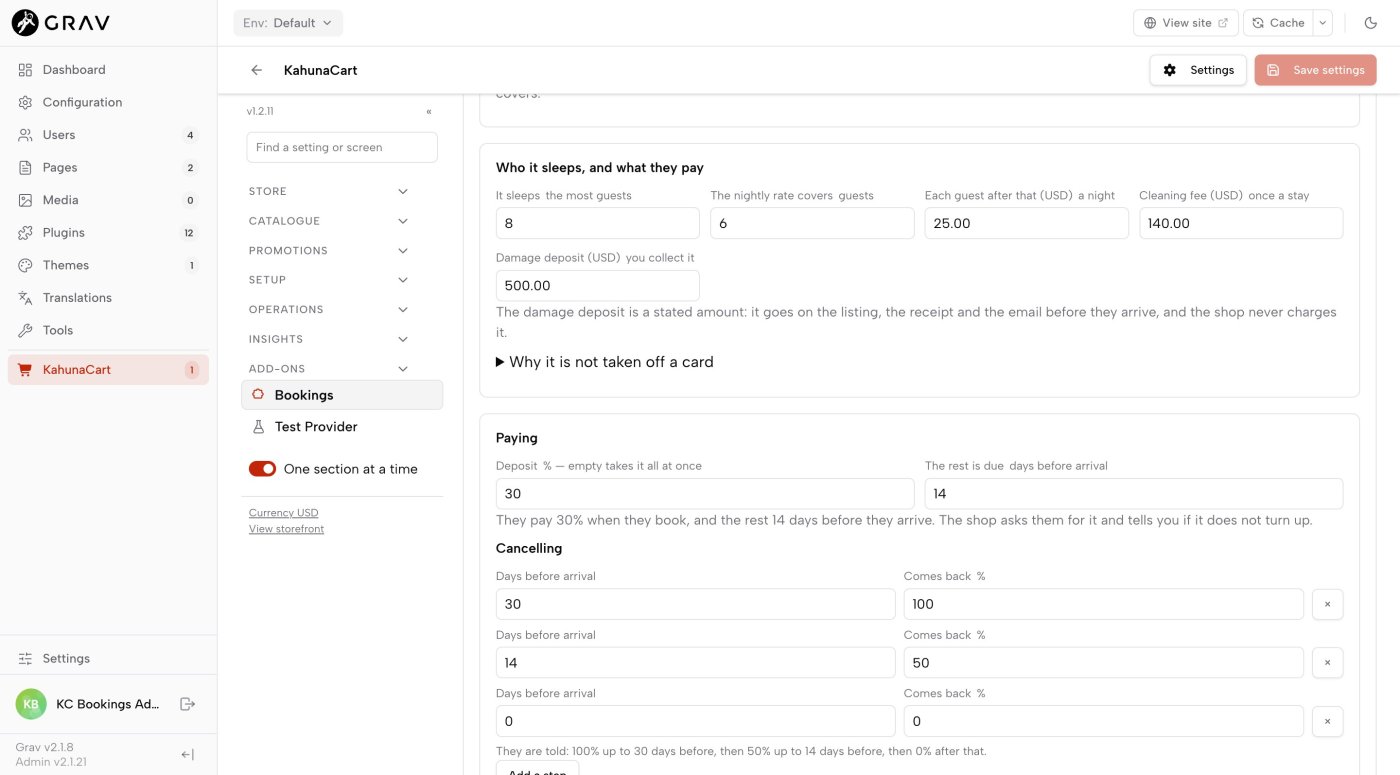
Take full payment at checkout, or enable deposits and set when the balance is due. Each property can have its own terms. Guests receive a payment link before the balance deadline, and you receive an alert if payment is overdue. Overdue payment does not automatically cancel the stay or release its nights.
- Show the full stay price, the amount due today and the balance deadline before the guest pays.
- Bookings made after the balance deadline require full payment at checkout.
- Cancellation releases the nights and creates a refund request for you to review and approve.
- The damage deposit appears on the listing, receipt and arrival email. You collect it separately; it does not place a card hold.
- Your existing checkout
- Take payment through your store’s provider. KahunaCart tracks payments, outstanding amounts and deadlines.
- Deposits apply to the stay
- Other products and sales tax are due in full at checkout. The checkout’s Due today total can therefore exceed the stay deposit shown in the quote.
- Price locked during the hold
- The quoted price stays fixed while the hold remains valid, even if rates change. An expired hold is refused rather than repriced.
- Clear refund requests
- Cancellation rules calculate the refundable share of payments made for the stay. Each request identifies the policy step used.
Your side of it
Keep track of stays and arrivals
See each property’s bookings across a month, with one bar per stay and clear same-day changeovers. The front desk offers two-week and month views, plus today’s arrivals and departures.
- Occupancy is measured in booked dates rather than opening hours.
- Use Check in and Check out from the desk. Today highlights arriving and departing guests.
- Stays appear on orders, customer records and receipts, with calendar invitations and a page where guests can reschedule or cancel.
- Take a telephone booking through New booking. Enter the dates and guest count, review the quote and press Book it. The desk shows To collect; payment is taken separately.
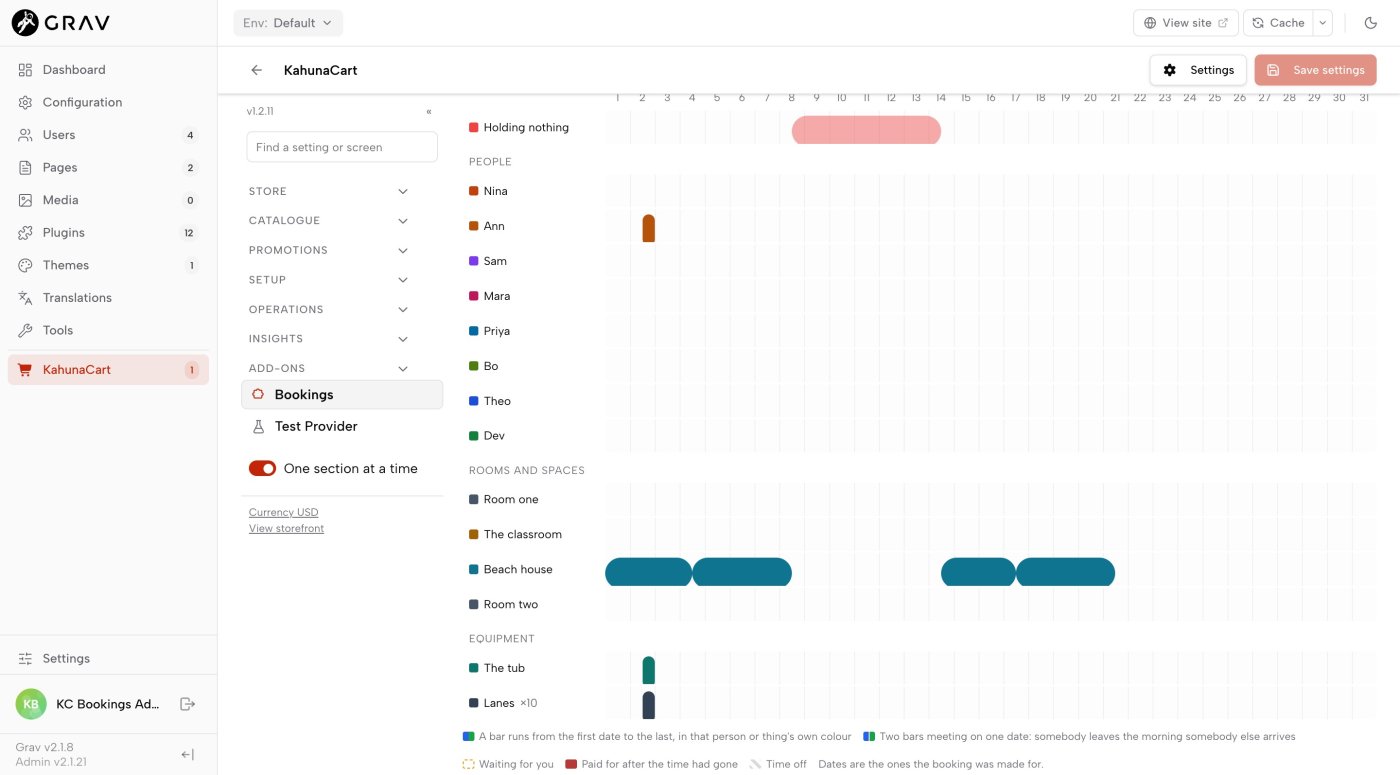
- Channel calendar sync
- Exchange calendar links with Airbnb, VRBO or Booking.com. Availability updates when each site refreshes its feeds, with imported reservations blocking the nights they cover.
- Private channel feeds
- Channel entries contain only Not available and two dates. Guest details and prices are excluded. Use a separate staff feed for a cleaner who needs booking details.
- Refresh delays
- Calendar sync is periodic. Two sites can sell the same dates before either refreshes; see the docs for handling a conflict.
- Arrival and follow-up emails
- Send directions and access instructions before arrival, then a thank-you after departure. Access instructions appear only in the arrival email.
Troubleshooting
Find out why a date is unavailable
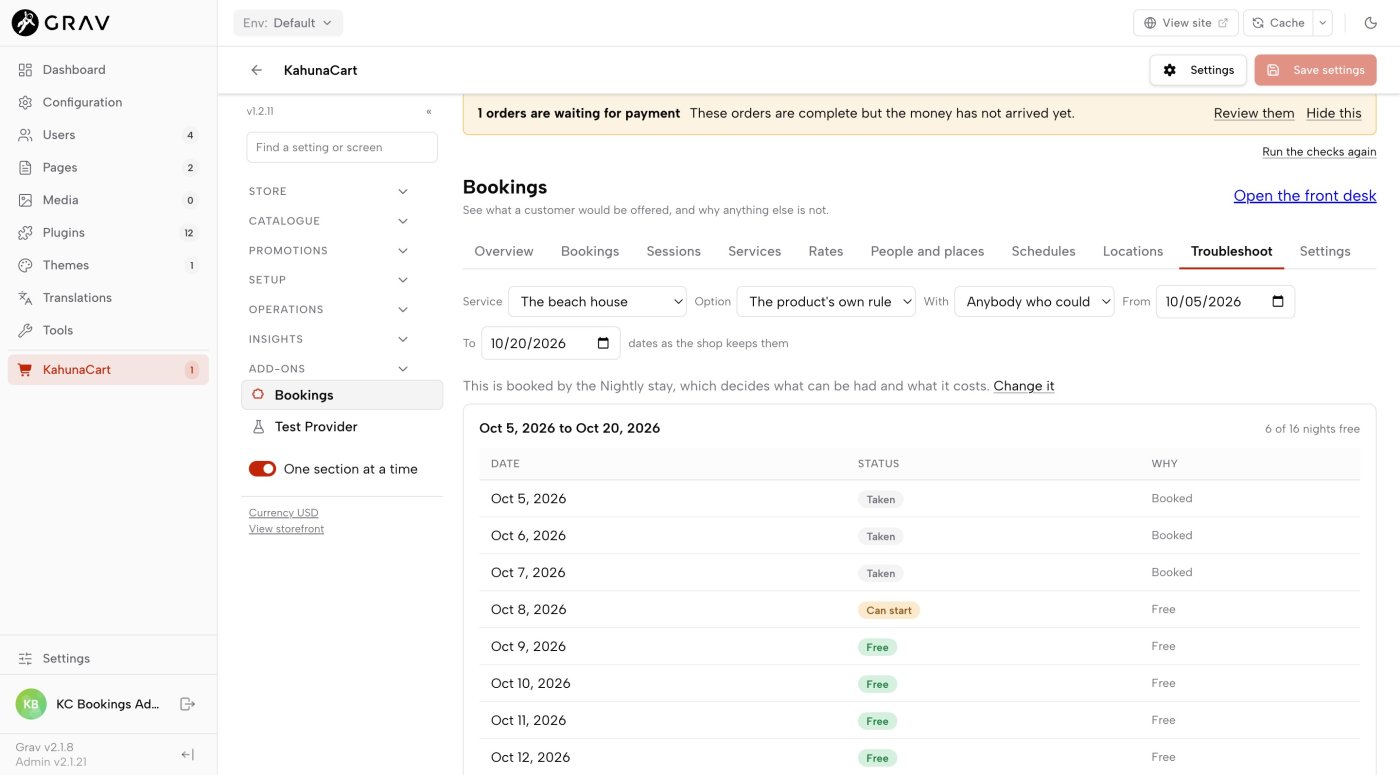
Choose a property and date range to see each night’s availability and the reason for any restriction. Troubleshoot uses the same availability engine as the guest calendar, quote and cart.
- Busy on Airbnb identifies the imported calendar blocking the dates.
- Gap restrictions identify the night that would be left unbookable.
- Check the same dates from the command line when diagnosing a booking problem.
- A failed calendar fetch raises a dashboard warning. The last successful copy remains in use for a day.
- Requires Bookings
- Rentals adds nightly stays to Bookings, using its properties, availability, orders, customer pages and front desk. Choose Bookings + Rentals if you need both.
- Uses Bookings permissions
- Staff who can view bookings can read rate cards. Staff who can manage services can edit nightly rates.
- Separate storage
- Rental rules and rate bands use two dedicated tables without adding columns to Bookings or KahunaCart tables.
- Try a complete example
- Run bin/plugin kahunacart-rentals seed rental to create a beach house with hours, rates, fees, payment terms, a cancellation policy and three example stays.
Questions
Common questions
What do I need to run Rentals?
The Bookings add-on, KahunaCart 1.2.11 or later and Grav 2. Rentals extends Bookings with nightly stays. No separate rental service or calendar account is required.
What can I rent out?
Holiday properties, B&B rooms, campsite pitches, cabins, boats or equipment rented by the day. The docs include a whole-property example and a four-room B&B, with seed commands to create each setup.
How do guests pay?
Through your existing cart, checkout and payment provider. Take full payment at checkout or enable a deposit with the balance due before arrival. Payment on arrival skips the cart.
Does it sync with Airbnb?
Yes, through calendar feeds. It also works with VRBO and Booking.com. Exchange links to update availability when each site refreshes. Two sites can still accept conflicting bookings between refreshes; see channel sync for details.
Does it hold a damage deposit on a card?
No. The damage deposit is a stated amount on the listing, receipt and arrival email. You collect it separately using your existing payment method.
Can I take a telephone booking?
Yes. In the front desk, tap New booking, choose the property and enter arrival, departure and guest count. Review the itemised quote and book the stay. Desk bookings have no order, deposit, balance deadline or balance reminder; the desk shows the full amount To collect. Use the property’s storefront page if you want to take an online deposit.
What are the limitations?
Rentals does not provide card holds for damage deposits, recurring weekend-only minimum stays, a single booking across multiple properties or direct channel-manager API connections.
How much does it cost?
Rentals only costs $149 for sites that have Bookings. Bookings + Rentals costs $249 for both. Choose either on the Rentals store page. To buy Rentals only, sign in with a licence covering Bookings or add Bookings to the same cart. The store offers a $49 saving when separate Bookings and Rentals purchases can be replaced with the bundle. Both choices are a one-time purchase for your site, with updates covered by your site’s single renewal.
Start taking direct rental bookings
Manage nightly stays alongside your shop’s orders and customers. Rentals requires Bookings. Choose Rentals only for $149 if you already own Bookings, or get both with Bookings + Rentals for $249.
Buy in the store