
Shipping
From checkout to the doorstep
Quote postage for the boxes you actually pack, buy labels beside the order and keep customers up to date as their parcels move. Connect Shippo, EasyPost, ShipEngine or Sendcloud and manage shipping in the same admin as your store. Explore the screenshots below, or try the read-only demo admin using the sign-in details on its login page.
Version 1.2.4 Released
Carriers
Your carriers, together in one place
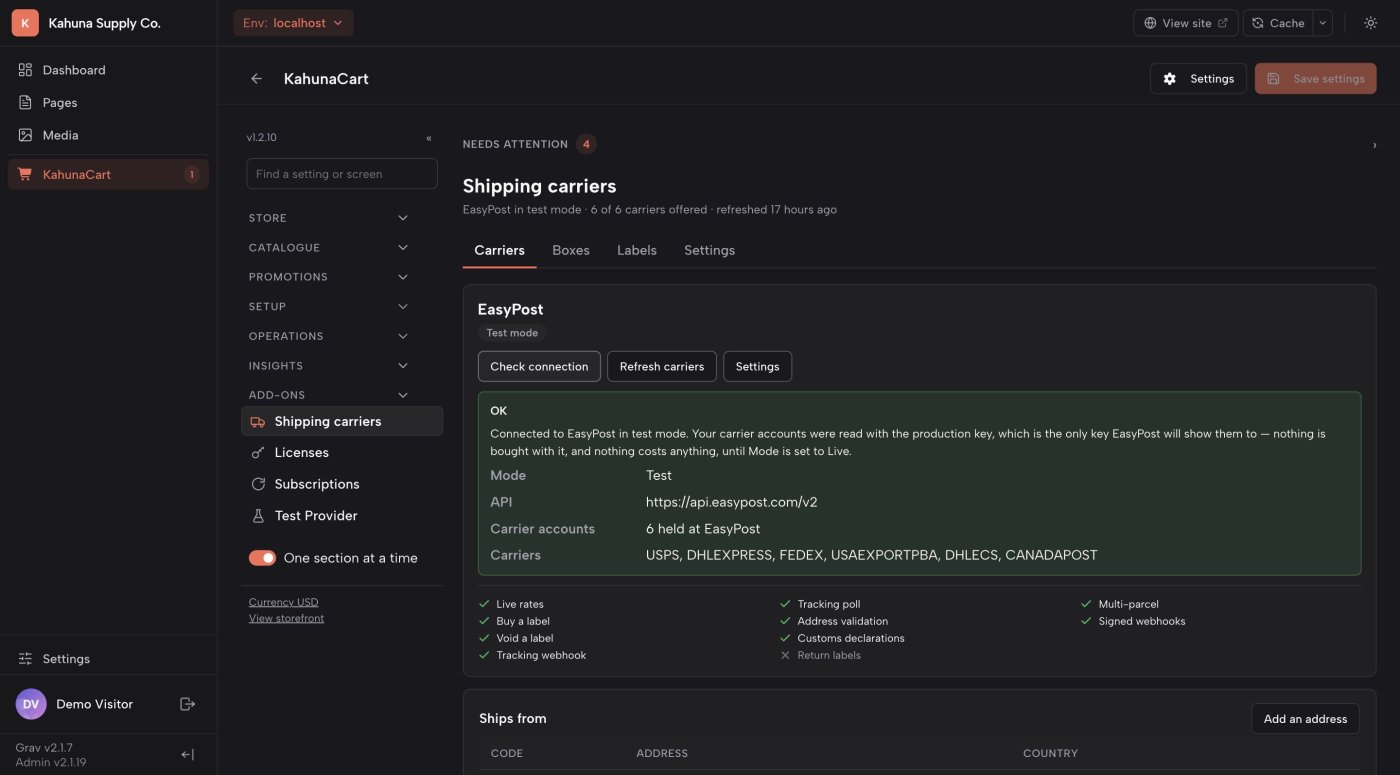
Choose Shippo, EasyPost, ShipEngine or Sendcloud, then connect the carrier accounts you want to use. See which services are available and decide which ones belong at your checkout.
- Check the connection and refresh your carrier accounts from the admin.
- Choose services by name when setting up shipping methods for each zone.
- Enable or disable an account without removing its saved settings.
- See which capabilities your chosen provider supports, including labels, tracking and address checks.
- One provider
- Choose Shippo, EasyPost, ShipEngine or Sendcloud for the store. The carriers and services available depend on your provider account.
- UK and Europe
- Sendcloud brings Royal Mail, Evri, DPD, PostNL, DHL, GLS, Colissimo and more, with live prices for stores shipping from the UK and much of Europe.
- Your services
- Offer the services you select in each shipping zone, with names your customers understand.
- Your rates
- Use the carrier accounts connected to your provider, including your own accounts where supported.
- Getting ready
- Add a ship-from address, your box sizes and product measurements before requesting live rates.
Boxes & packing
Price the parcel you will actually send
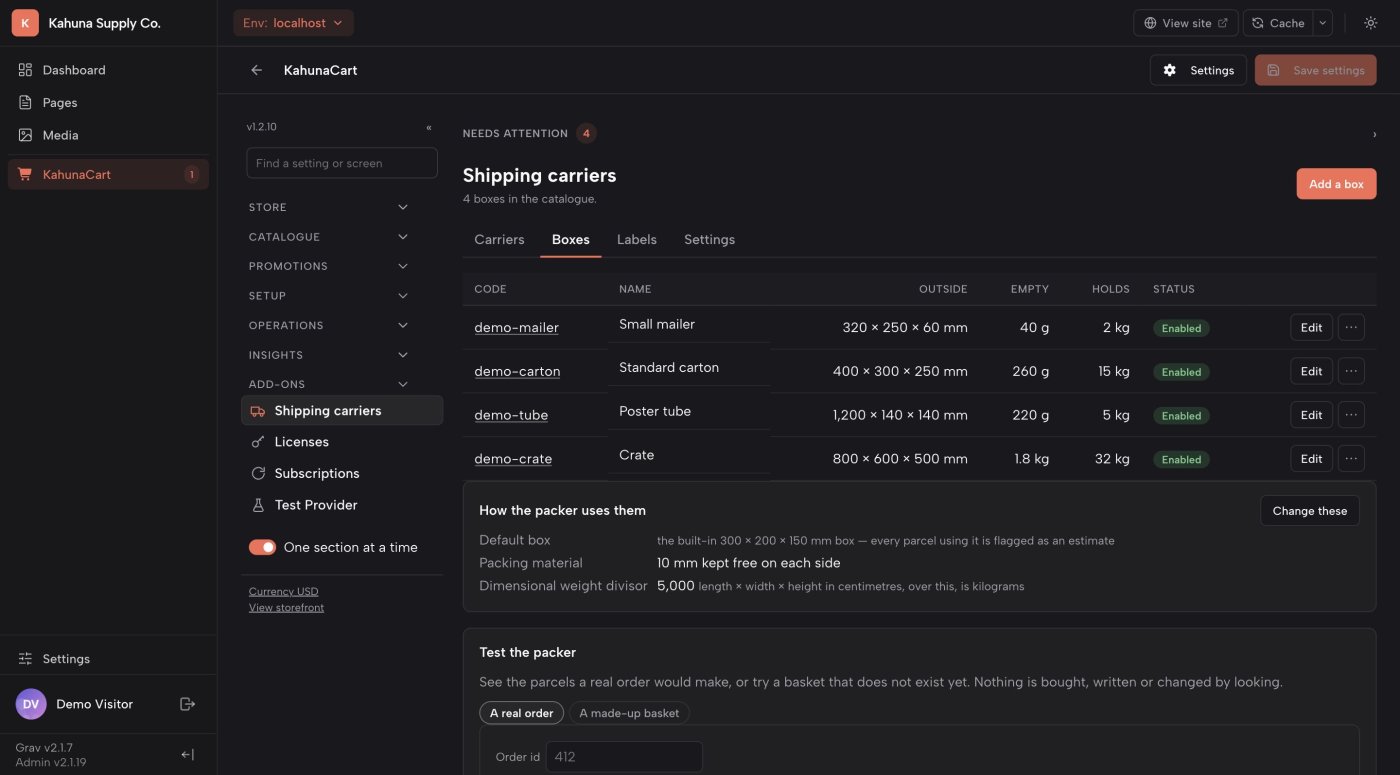
Save the boxes you keep on the shelf, including their dimensions, empty weight and maximum load. The packer uses product measurements to propose parcels for each order.
- Pack an order into the smallest suitable boxes from your catalog.
- Account for packaging weight as well as the products inside.
- See when a parcel’s size makes its billable weight higher than its scale weight.
- Test the packer before going live and review the proposed contents of each box.
- Box catalog
- Record outer dimensions, optional inner dimensions, empty weight and maximum weight for each box you use.
- Product measurements
- Store weight and dimensions with your products and variants so quotes reflect the goods in the basket.
- Several parcels
- Orders can be split across boxes. Multi-parcel services depend on the selected carrier.
- Packing preview
- Review the suggested boxes and their contents before buying a label.
Checkout rates
Give customers a shipping price for their basket
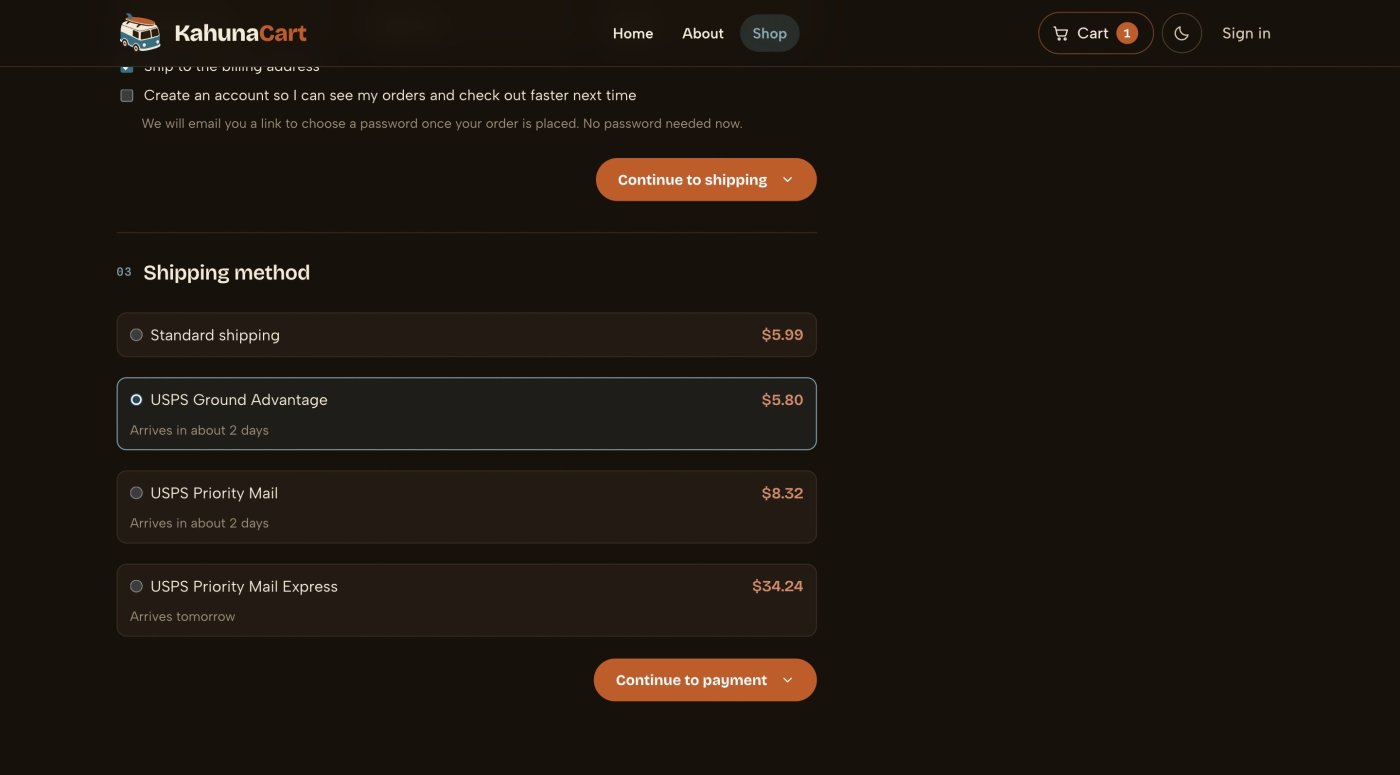
The customer enters a delivery address, and your selected services return prices for the packed order. Carrier rates appear alongside the other shipping options you have configured.
- Offer different carrier services in each delivery zone.
- Request prices using the parcel dimensions, billable weight and destination.
- Show delivery estimates when the carrier supplies them.
- Choose a fallback shipping method so an unavailable carrier need not stop checkout.
- Controlled choice
- You decide which services appear. Customers choose from your configured shipping methods.
- Delivery estimates
- Transit information is shown when available from the carrier; availability varies by service.
- When a rate fails
- Unavailable services explain why they cannot be selected. A configured fallback can keep the order moving.
- No postage purchase
- A checkout quote does not buy a shipping label. Label purchase is a separate step in fulfillment.
Shipping labels
Buy the label where you manage the order
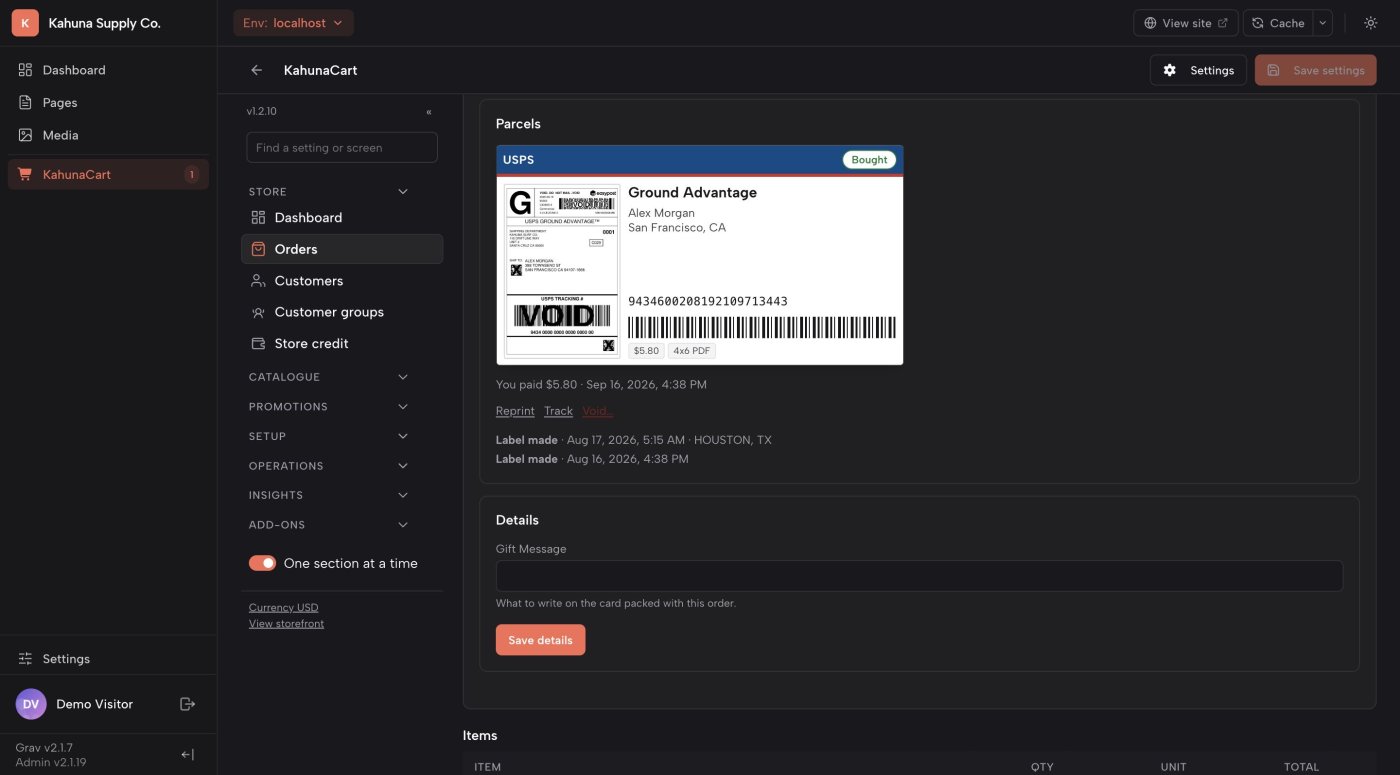
Review the parcels, destination and service price, then buy the label from the order screen. The label card keeps the file, tracking number and postage cost beside the items you are sending.
- See the service and price before confirming a purchase.
- Print PDF, PNG or ZPL labels where supported by the carrier.
- Record the parcel on the order and choose whether to notify the customer.
- Reprint the stored label or request a void when a shipment changes.
- Print formats
- Choose a 4×6 PDF, letter PDF, PNG or ZPL. Available formats depend on your carrier.
- Saved copy
- The label file is stored with the order for later printing. Preview images appear where the provider supplies them.
- Uncertain purchase
- If the carrier reply is lost, the store checks what happened before allowing another purchase.
- Voids
- Request a void from the order. Approval and refund timing depend on the carrier and provider.
Tracking
Keep the parcel’s progress with the order
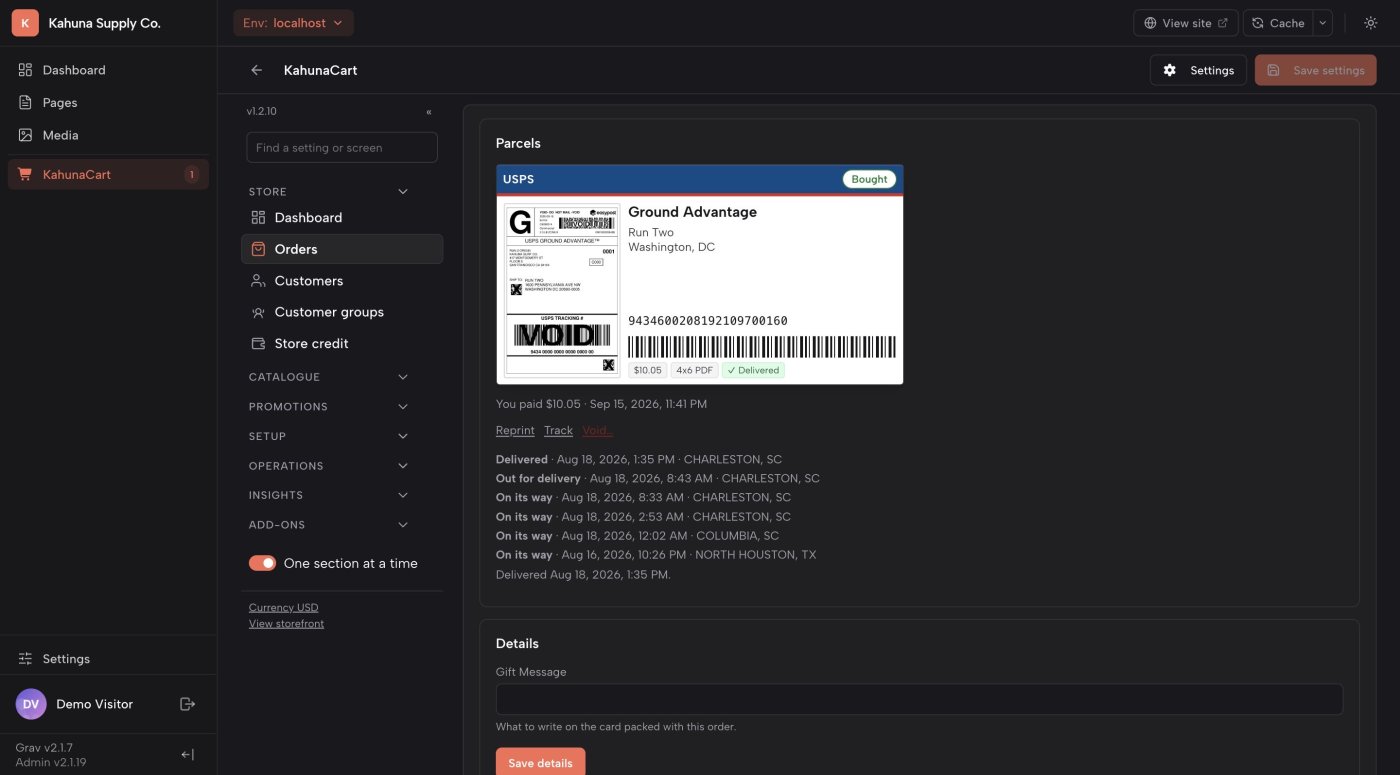
Follow a shipment from its first scan to delivery. Staff can review its history in the admin, and customers can check their parcel from their receipt or account.
- See the carrier’s latest status and the sequence of tracking events.
- Give customers a link to the carrier’s own tracking page.
- Send a delivered email when the carrier confirms arrival.
- Receive an owner notification when a parcel fails or is returned.
- Automatic updates
- Configured webhooks receive tracking updates, with scheduled polling as a backup.
- Customer view
- Customers see their parcel status and tracking link, without the label file or your postage cost.
- Delivery email
- A delivered notification is separate from the shipping confirmation and can be disabled in the store’s notification settings.
- Demo carrier
- The built-in demo carrier simulates a parcel’s journey so you can explore tracking without sending a real package.
International shipping
Prepare customs details before the label
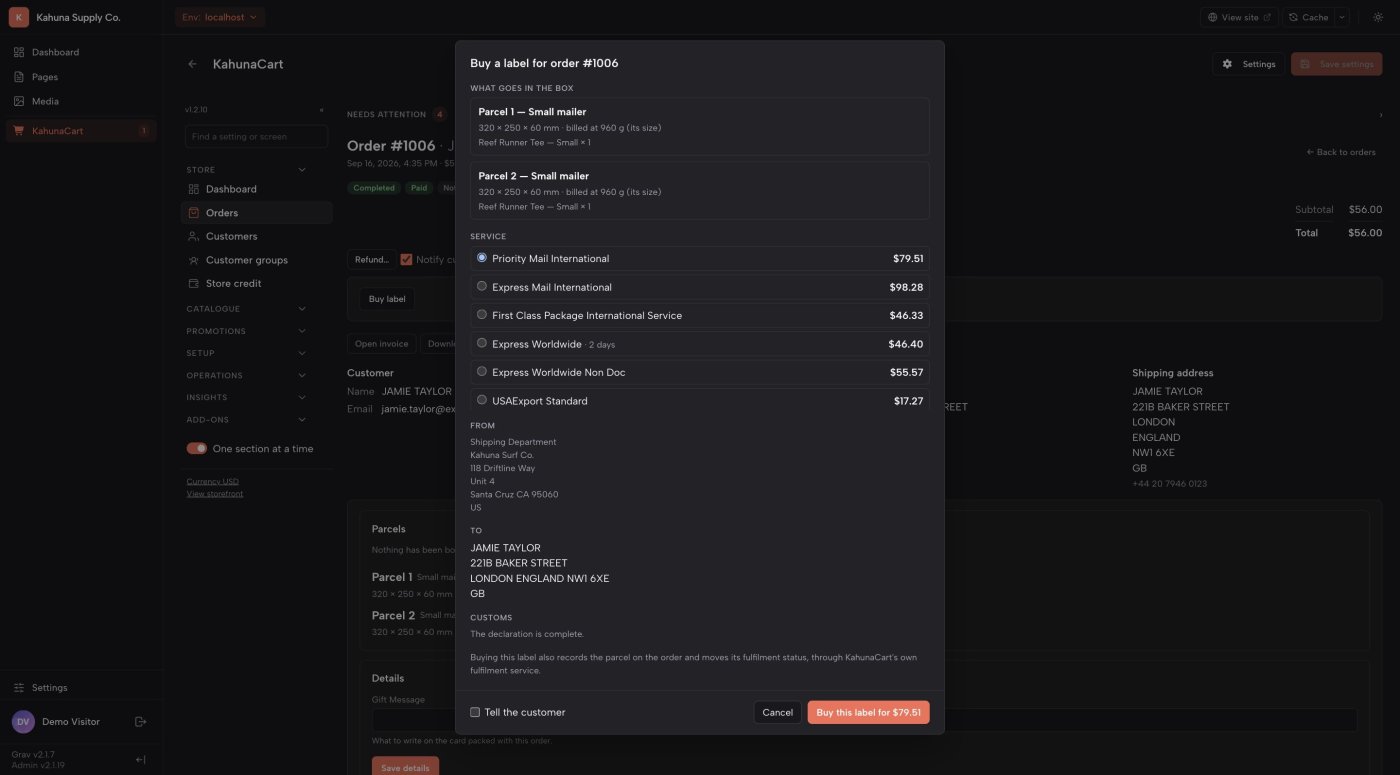
For an order crossing a border, Shipping builds a declaration from the items being sent. Review the products’ descriptions, values and countries of origin before buying the international label.
- Save customs descriptions, tariff codes and countries of origin with products and variants.
- Use store defaults for the details shared by your catalog.
- See missing information by order line before buying a label.
- Keep a commercial-invoice link with the label when the provider returns one.
- Product defaults
- A variant can override its product’s customs description, country of origin or tariff code.
- Store defaults
- Set the certifying signer, contents type and instructions for a parcel that cannot be delivered.
- International services
- Available destinations, services and customs documents depend on the carrier and provider.
- Special exports
- Some declarations need to be completed with the provider. The ShipEngine driver does not currently transmit AES ITN filing references.
Questions
Common questions
Do I still need a shipping provider account?
Yes. Shipping connects your store to Shippo, EasyPost, ShipEngine or Sendcloud. Your provider handles carrier connections and postage charges; availability depends on your account and the services you enable.
Does it work for shops in the UK and Europe?
Yes. Choose Sendcloud, which ships from the UK, the Netherlands, Belgium, Germany, France, Spain, Italy and Austria, and quotes live prices for carriers such as Royal Mail, Evri, DPD, PostNL, DHL and GLS. Sendcloud has a free plan. Pickup points and parcel lockers are not offered at checkout yet.
Can I keep my flat-rate shipping methods?
Yes. Carrier services work alongside the shipping methods configured in KahunaCart. You can also nominate a fallback method for times when a carrier cannot return a quote.
Can I try the workflow without buying postage?
Yes. The built-in demo carrier quotes, prints sample labels and simulates tracking without contacting a provider. Provider sandbox modes are also supported, although their tracking and refund behavior varies. Sendcloud has no sandbox, so in test mode every label is bought as Sendcloud's free test label.
What do I need to run Shipping?
You need Grav 2, KahunaCart 1.4.4 or later, a ship-from address, box sizes and product measurements. Run the store scheduler for background jobs and tracking, and configure email delivery if you want customer notifications.
Does it support return labels?
Not yet. You can request a void for an unused outbound label where the carrier allows it. Creating a prepaid return label is a separate workflow and is not currently supported.
Does buying the add-on include postage?
No. The add-on connects shipping to your store. Carrier postage and any provider fees are charged separately through your shipping provider. Shipping itself is a one-time purchase for your site, with updates covered by your site's single renewal. See the store for the add-on price.
Manage shipping in KahunaCart.
Buy Shipping once for your site. From the first postage quote to the final delivery scan, manage your parcels alongside your products, customers and orders, with updates covered by your site renewal.
Buy in the store