Skip to content

For developers

Build storefronts and store integrations

Use the storefront JSON API for cart and checkout interactions, and the authenticated REST API for administration. Extend the store with events, webhooks, Twig functions, CLI commands and add-ons. Documentation coverage is checked by tests.

Two APIs

Storefront sessions and authenticated administration

The storefront API acts on the shopper's cart. The admin API supports staff tools and external integrations, with authentication and permissions for store operations.

Public, session based

Storefront JSON API

The storefront API runs under /shop/api by default and uses the shopper's session. Writes require application/json. Set storefront_api.enabled: false to disable these routes.

The 16 endpoints

MethodPathAnswers
GET /api/cart The session's cart, empty or not
PATCH /api/cart The cart, address or shipping method set
DELETE /api/cart 204, the cart emptied
POST /api/cart/items 201 and the cart, a line added
PATCH /api/cart/items/{id} The cart, quantity changed; 0 removes the line
DELETE /api/cart/items/{id} The cart, a line removed
POST /api/cart/coupons The cart, a code applied
DELETE /api/cart/coupons/{code} The cart, a code taken off
DELETE /api/cart/payment The cart, an open payment page cancelled
POST /api/cart/bundles The cart, a bundle's parts swapped for the bundle
DELETE /api/cart/bundles/{variant_id} The cart, that bundle no longer offered
GET /api/shipping The zone and the methods on offer, or 422
GET /api/payment-methods The gateways and methods this cart may use
POST /api/checkout Order placed: complete, redirect, or 422
GET /api/countries Every country, and which have regions
GET /api/countries/{code}/regions The states or provinces of one

One error object

{
  "error": {
    "status": 422,
    "code": "validation",
    "title": "Validation failed",
    "detail": "The line could not be added.",
    "fields": { "qty": "must be a whole number of at least 1" }
  }
}

Errors return a stable code, a readable detail and any field errors. A 422 response covers issues the shopper can resolve, such as invalid input or a missing shipping address.
Token, permissions

Admin REST API

Admin routes run under /api/v1/kahunacart/... through Grav's API plugin. They accept an API key or JWT in X-API-Token, or an authenticated admin session. Errors use RFC 7807 problem documents, and rate-limit headers accompany responses.

411
routes
315
paths
68
controllers
11
permissions

What it covers

  • Products, options, variants, media, releases
  • Categories, tags, attributes, catalog index
  • Orders, changes, shipments, refunds, quotes
  • Customers, groups, store credit, gift cards
  • Coupons, campaigns, sales, price lists
  • Tax, shipping, pickup, payment methods
  • Webhooks, jobs, health, notifications
  • Reports, analytics, dashboard alerts
  • Custom fields, settings store, zones, config transfer
  • Grav user and group permissions control each action. Refund permission is separate from order-management permission.
  • MCP tools use the same administration routes and permission checks.

Token in, problem document out

curl -s -H "X-API-Token: $KC_TOKEN" \
  https://example.com/api/v1/kahunacart/products/7
{ "data": { "product":
    { "id": 7, "slug": "reef-runner-tee" } } }
# A bad write is an RFC 7807 problem document
{ "status": 422, "title": "Validation failed",
  "detail": "Attribute 'material' has no option 'hemp'; it accepts cotton, linen, wool" }

Building a custom frontend? Use the storefront API for carts and checkout. Catalog reads currently require the admin API with a read token; there is no public catalog endpoint.

Real calls

Examples from the developer documentation

These examples show storefront and admin requests, Twig components, event handling and command-line tools.

Storefront API

Add an item and receive the updated cart in the response. Set an address before requesting shipping quotes.

shop.example.com
# Public: the shopper's own session, no token
curl -s -X POST https://example.com/shop/api/cart/items \
  -H 'Content-Type: application/json' \
  -d '{"variant_id": 34, "qty": 2}'
{
  "id": 412, "currency": "USD", "item_count": 2,
  "items": [
    { "id": 981, "sku": "TSHIRT-M", "title": "T-shirt (M)", "qty": 2,
      "unit_price_minor": 1999, "unit_price_formatted": "$19.99",
      "total_minor": 3998, "total_formatted": "$39.98" }
  ],
  "totals": { "total_minor": 3998, "total_formatted": "$39.98" }
}
# Set the address, then ask for quotes. No address is a 422, not an empty list
curl -s -X PATCH https://example.com/shop/api/cart \
  -H 'Content-Type: application/json' \
  -d '{"address": {"country": "US", "region": "CA", "postcode": "94103"}}'
curl -s https://example.com/shop/api/shipping
{
  "required": true, "address_known": true,
  "zone": { "id": 2, "name": "United States" },
  "methods": [
    { "id": 5, "label": "Standard", "rate_minor": 500, "rate_formatted": "$5.00", "selected": false }
  ]
}

Admin API

Generate an API key and list orders. X-API-Token avoids Authorization-header forwarding issues on some FastCGI hosts.

shop.example.com
# Mint an API key. It is shown once
bin/plugin api keys:generate --user=admin --name="Warehouse sync"

# Every order that got past the cart, newest first
curl -s "https://example.com/api/v1/kahunacart/orders?per_page=2" \
  -H "X-API-Token: $KC_TOKEN"
{ "data": { "orders": [
    { "number": "1042", "email": "[email protected]", "payment_status": "paid",
      "fulfillment_status": "unfulfilled", "total_minor": 18600 },
    { "number": "1041", "email": "[email protected]", "payment_status": "paid",
      "fulfillment_status": "shipped", "total_minor": 6490 }
  ], "page": 1, "per_page": 2 } }

Twig

Display a product grid or buy button in a Twig template. The URL helper uses your configured storefront route.

themes/your-theme/templates/partials/shop-strip.html.twig
{% for product in kahunacart_products(4) %}
    <a href="{{ kahunacart_url('/product/' ~ product.slug) }}">
        <h3>{{ product.title }}</h3>
        <p>{{ kahunacart_price(product.default_variant.price_minor) }}</p>
    </a>
{% endfor %}

{# Or hand the list to the shipped grid: pictures, prices and empty states included #}
{% include 'partials/kahunacart-product-grid.html.twig' with {products: kahunacart_products(8)} %}

{# A buy button on a landing page or a blog post #}
{% include 'partials/kahunacart-buy-button.html.twig' with {product: kahunacart_product('my-widget')} %}

Events

Subscribe to store events through Grav's dispatcher. Queue work that contacts an external service.

user/plugins/my-addon/my-addon.php
use Grav\Plugin\KahunaCart\Event\Events;
use RocketTheme\Toolbox\Event\Event;

public static function getSubscribedEvents(): array
{
    return [Events::ORDER_COMPLETED => ['onOrderCompleted', 0]];
}

public function onOrderCompleted(Event $event): void
{
    $order = $event['order'];

    // Anything that talks to another server belongs in a job.
    // Register the handler on Events::REGISTER_JOB_HANDLERS.
}

CLI

Run installation checks from the CLI. A non-zero exit code lets deployment scripts detect a failed check.

shop.example.com
# The installation doctor: ten checks, each with a suggested fix
bin/plugin kahunacart check
OK database SQLite, strict mode onOK migrations 0 pendingOK webhooks every active subscription answered the ping10 checks: 10 passed, 0 warnings, 0 failed
# Wipe the test data before going live and keep every setting
bin/plugin kahunacart reset --orders --customers --keep-settings

# A benchmark-sized store: 5,000 products and 250,000 orders
bin/plugin kahunacart bench:seed --profile=balanced

# Scaffold an installable add-on with a test that already passes
bin/plugin kahunacart make:provider warranty

The toolkit

Tools for extending the store

Use these interfaces to add functionality, automate operations and customize the storefront.

377 MCP tools

Connect MCP clients to administration tools with the same store permissions. AI-readable documentation includes llms.txt and llms-full.txt.

105 events and 5 hooks with an undo

Subscribe through Grav's dispatcher. Compensating hooks pair an action with an undo at five lifecycle points; a later failure runs completed actions' undos in reverse order.

Signed webhooks

Subscribe to named topics or events. Deliveries are signed, retried with backoff and logged, with automatic deactivation after repeated failures.

60 Twig functions

Add products and cart components to your theme. Override supplied templates and use templates:drift to check for outdated overrides.

40 CLI commands

Manage migrations, imports, exports, jobs, configuration and benchmarks under bin/plugin kahunacart. Generators provide starting files for add-ons.

Custom fields and a settings store

Add typed fields to products, variants, orders, order items, customers and addresses. A namespaced settings store holds add-on configuration.

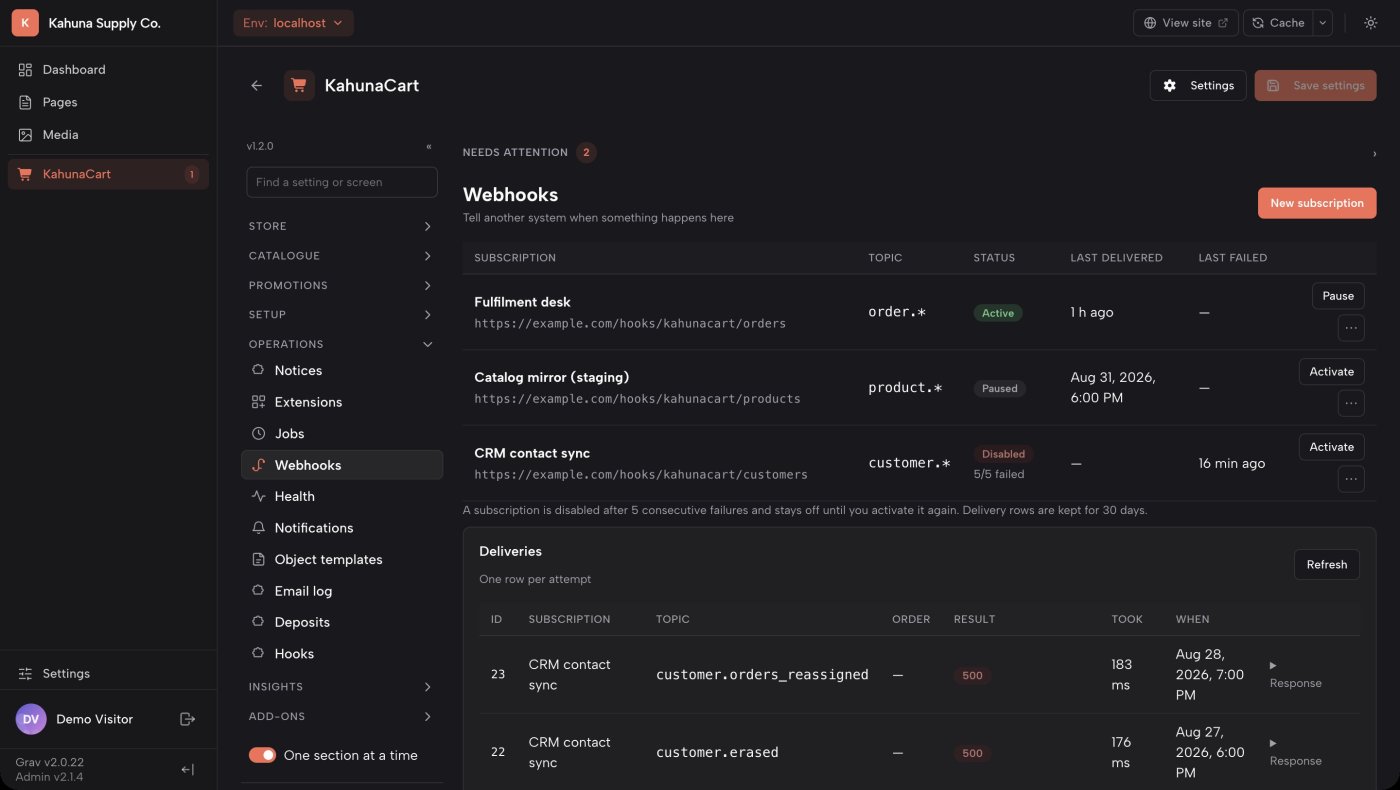
Outbound webhooks

Track webhook deliveries and retries

Subscribe a URL to a store topic. The worker signs and sends each event, then records the response, duration and any error in the delivery log.

  • View the signing secret when it is created and rotate it when needed.
  • Activate a subscription after its endpoint responds successfully to a test ping.
  • Deactivate after five consecutive failures; a successful delivery resets the count.
  • List available topics with webhooks:subscriptions --topics.
yoursite.com/admin/kahunacart#/webhooks
The KahunaCart Webhooks screen in the Grav admin, with a list of subscriptions and the delivery log beneath

Build an add-on

Build an add-on with Grav's plugin API

Register store features through KahunaCart events. Payment providers, License Keys, Subscriptions and Newsletters use the same extension interfaces available to your plugin.

What an add-on can register

  • Admin sectionsA whole screen of its own in the sidebar, under Add-ons
  • Dashboard widgets and alertsA tile on the dashboard, or a line in the alert strip
  • Order, product and customer panelsIn the admin, on the receipt, in the account area
  • A settings namespaceScoped settings stored for you in the settings table
  • Checkout fieldsWith the conditions that decide when each is required
  • Product typesA new kind of thing the store can sell
  • Payment providersOn the same contract the 13 shipped ones implement
  • Tax enginesQuote tax through your own service, per region
  • Carrier rate providersLive rates from a carrier, attached to a quote
  • Discount operations and shipping methodsA rule operation, or a rate calculator

Start from a generator

Generate an installable plugin with its class, configuration, language file, Composer setup and initial test.

bin/plugin kahunacart make:provider warranty
cd user/plugins/kahunacart-warranty
composer install && vendor/bin/phpunit

Test against a real store

StoreHarness::create() provides a migrated in-memory SQLite store and core services for tests. It runs without Grav and can be used in CI.

use Grav\Plugin\KahunaCart\Testing\StoreHarness;

$store = StoreHarness::create();

Register interface components

Place widgets in the documented admin and storefront zones. Merchants can reorder them in Extensions, and add-ons can register additional zones. $store = StoreHarness::create();

The provider contract

A versioned contract with declared capabilities

Implement the payment contract and declare the operations your provider supports. The admin uses those declarations to show capture, void and refund actions. Tests check the generated capability documentation against the declarations.

  • Authorize, capture, void
  • Saved cards
  • Off-session charging
  • Recurring billing
  • Catalog sync
  • Webhook setup
  • Connection checks
  • Refunds, full or partial

In the admin

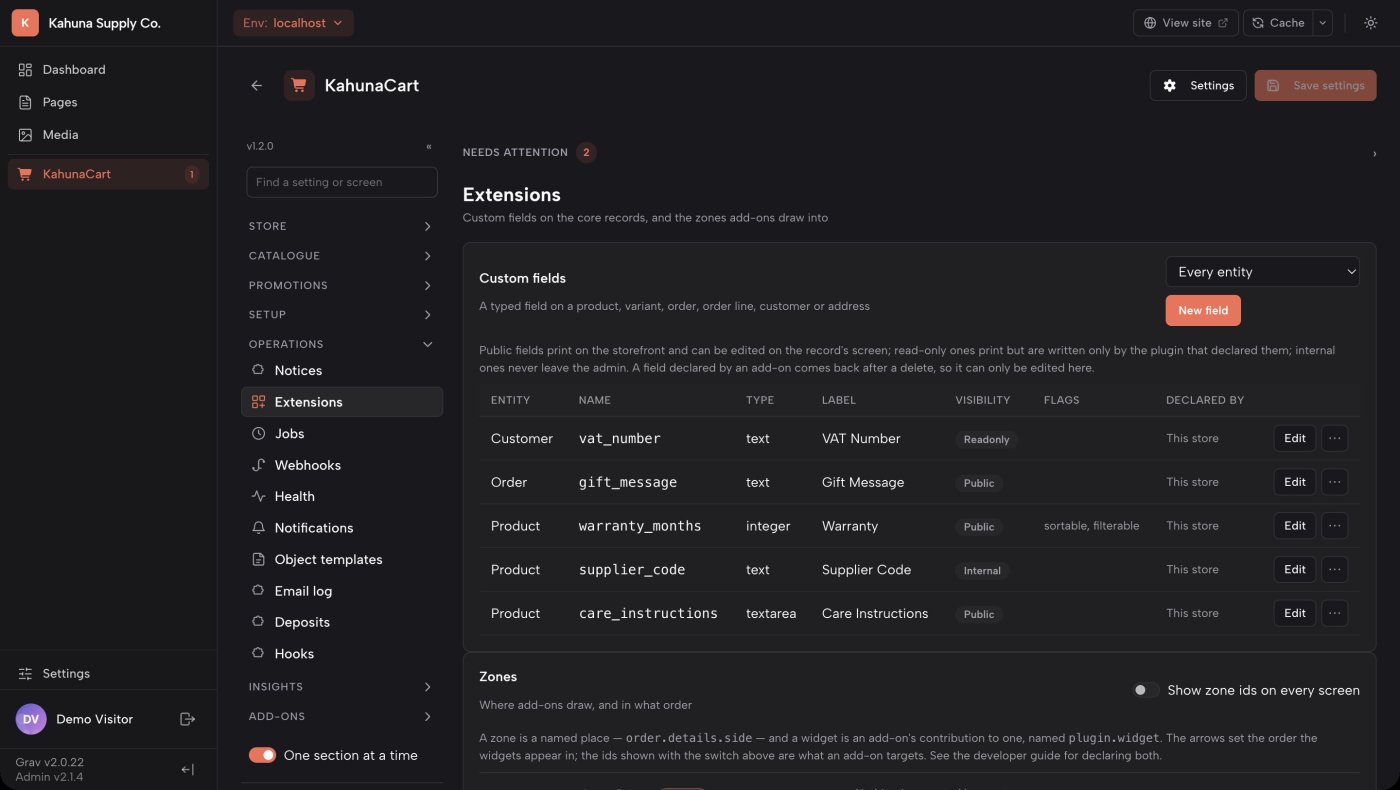
Manage add-on fields, widgets and hooks

The Extensions screen lists custom fields and registered widgets, with controls for their display order. The Hooks screen shows handlers and their execution history, including undo operations.

  • Registered admin sections appear under Add-ons in the sidebar.
  • Compatibility declarations control whether optional store features can be enabled with an add-on.
  • The Health screen runs the same checks as bin/plugin kahunacart check.
yoursite.com/admin/kahunacart#/extensions
The KahunaCart Extensions screen in the Grav admin, listing zones and the widgets add-ons have mounted into them

Questions

Common questions

Can I build a headless storefront?

Yes. The storefront API covers carts, coupons, shipping quotes, payment methods and checkout. Catalog reads currently require an authenticated admin API request. There is no public catalog endpoint.

Do I have to use the supplied templates?

No. Override the Twig templates individually or use the Twig functions to add components to your existing pages. Template version markers help identify overrides that need updating.

How do I build a payment provider?

Start with bin/plugin kahunacart make:provider <name>, then implement the provider contract and declare supported capabilities. Follow the developer guide for payment creation, webhooks, refunds and testing.

How can I test without real payments?

Use the test provider and seeded catalog. The benchmark seeder creates a larger dataset for performance testing. Use the documented reset command to remove test records before launch.

Which versions are required?

PHP 8.3 or later with PDO, Grav 2.0 or later and API plugin 1.0 or later. Supported databases include SQLite, MySQL 8, MariaDB 10.6 and PostgreSQL 14 or later.

Start with the developer guides.

Find API references, event details, template examples and instructions for building providers and add-ons.

Read the developer docs