
Print on demand
Sell it. They print it.
Sell shirts, mugs, posters and prints that Printful, Printify or Gelato make and ship for you. The customer pays your store, the printer posts the parcel, and the tracking lands on your order. Every order waits for your OK before anything is printed or charged.
Version 1.0.3 Released
Providers
Three printers, one store
Connect Printful, Printify or Gelato, or all three. Each product is made by one of them, so checkout never has to choose.
| Printful | Printify | Gelato | |
|---|---|---|---|
| Good for | Clothing and accessories, embroidery included | A wide catalogue from many print providers | Clothing, hats and mugs as well as wall art and cards, printed near the customer |
| Your designs | Made in Printful's designer, then imported | Made in Printify's designer, then imported | From a Gelato template |
| Your own files | Yes, on Printful's blanks | No | Yes, it's the only way Gelato works |
| Before sending | A free draft | An order on hold | A free draft |
| Webhooks | Set up for you | Set up for you | Added by you in Gelato's dashboard |
Every price is the provider's own. What a blank costs, what postage costs and what you pay per order are set by the provider and your account with it, so compare them there.
- Your accounts
- You connect your own Printful, Printify or Gelato account. They bill you, and you bill your customer.
- Printify
- Set your Printify shop to Manual order approval. KahunaCart won't switch Printify on until you confirm it, because a shop left on its default prints every order by itself after 24 hours.
- No account yet?
- A built-in demo printer, Kahuna Print Co., fills every screen with pretend products and orders so you can look around first.
- Checks
- One button checks each connection with a real call and names anything the token is missing.
Your designs
Design it there, sell it here
Design a product in Printful's or Printify's own designer, then bring it into your store with its colours, sizes, pictures and costs.
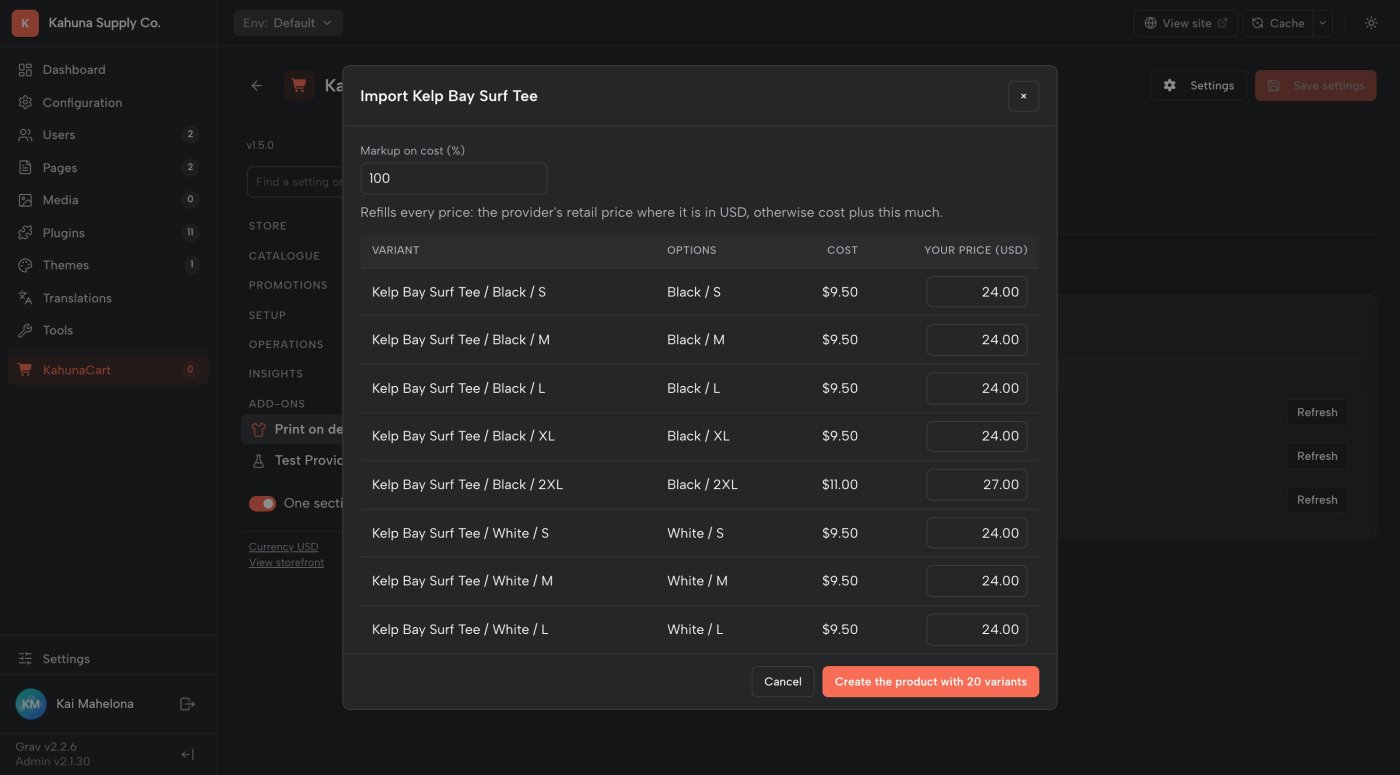
- The import sheet shows every variant's cost beside a suggested price. You confirm the prices; nothing comes in without them.
- Each product arrives as a draft. You check it and publish it. KahunaCart never publishes anything for you.
- Refresh brings the provider's new costs and variants in later, without touching your prices or pictures.
- Switch on auto-sync and products you publish at the provider show up as drafts by themselves, with a note on your Review tab.
- When a provider raises a cost, you hear about it. Your prices never change on their own.
- Pricing
- The provider's retail price when it's in your store's currency, otherwise cost plus your markup. Always yours to change.
- Pictures
- The provider's mockups are copied into the product and attached to the right colours.
- Stock
- The provider holds it. A variant it stops making is refused at the cart with a sentence your customer understands.
- Gelato
- Gelato templates come in the same way, then wait for your print files.
Your own files
Your artwork, their blanks
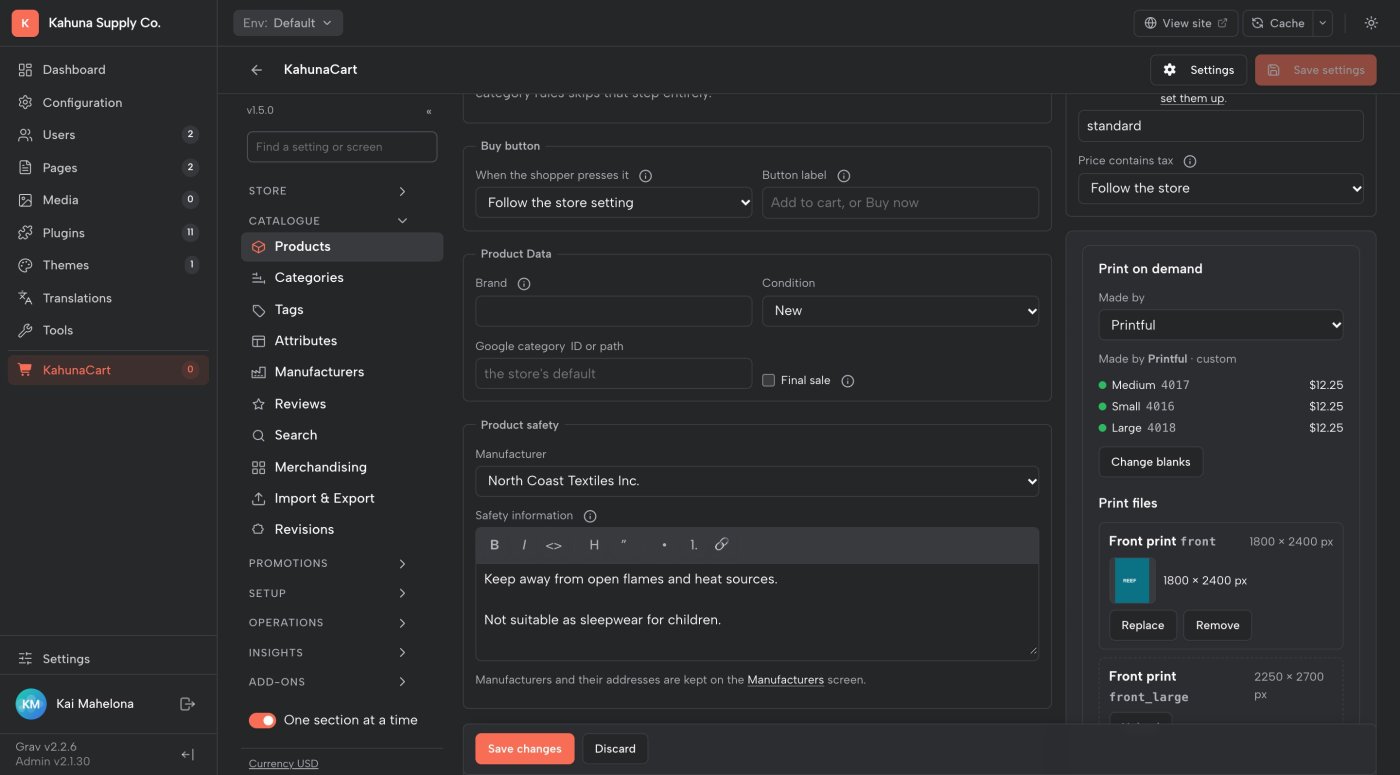
Already have a library of print files? Pick the provider's blank for each variant, upload the file for each print area, and they're put together when the order goes out.
- Made by on any product picks the provider. Search its catalogue ("Bella Canvas 3001", "posters a3") and your colours and sizes are matched to the blank's.
- Upload a PNG, JPEG or PDF per print area. The file's size is checked against what the printer wants, and you're warned when it would print soft.
- Your files stay private. The printer fetches each one from an address only its order knows.
- Moving a big store in? Assign by SKU links a whole range of SKUs at once, and a links spreadsheet brings in thousands of SKUs, blanks and file links in one go. Both show you a dry run first, and both can be undone.
- Providers
- Printful and Gelato. Printify can't take your own files through its API.
- Placement
- There's no designer. Make each file the size of its print area with the design where you want it.
- Mixing
- One order can hold a Printful design you imported and a Printful blank with your own file. It goes to Printful as one order.
- Spreadsheet
- One row per SKU: the provider, the blank and a file link per print area. Every bad line is named by its line number.
Checkout
The printer's postage, priced live
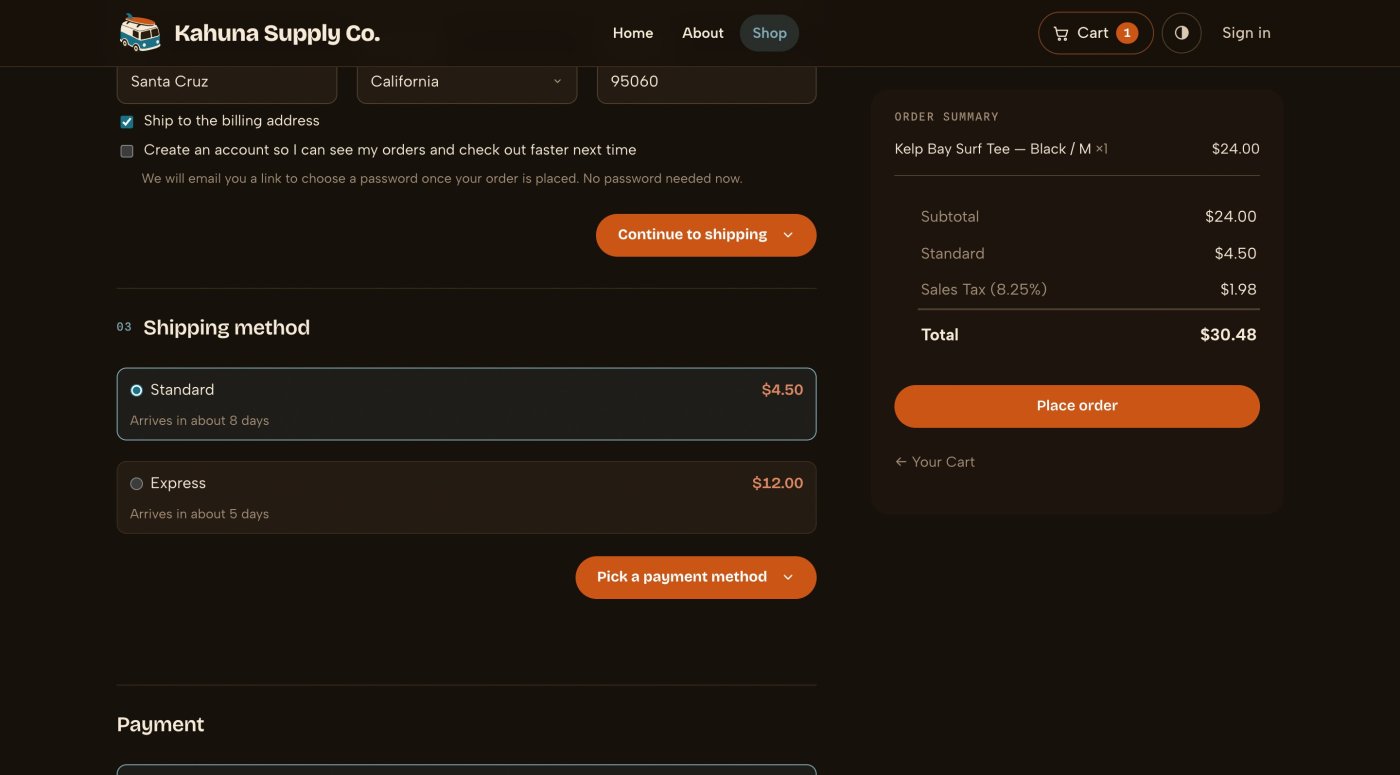
A printed parcel ships from the printer, so it's charged at the printer's prices. Your customer sees the provider's own delivery options at checkout, priced while they wait.
- One button adds the services the provider actually offers your products in each shipping zone.
- "Arrives in about 7 days" counts the printing too.
- Your own $5 flat rate is turned down for a parcel the printer carries, so it can't end up paying for $9 of Printful postage. Turn that off if you'd rather absorb the difference.
- If the provider can't be reached, your fallback method carries the order. Checkout never blocks.
- Addresses are checked for what the printer needs (a state, a phone number, a tax number for Brazil) before the customer pays.
- Currency
- Rates come back in the order's currency. Printify answers in your Printify billing currency, so its rates show on orders in that currency.
- Mixed carts
- A printed shirt and a mug you post yourself are two parcels, charged separately and added up.
- Duties
- A parcel crossing a border says import duties may be due on delivery.
- Privacy
- Your customer is never told who prints their order.
Docs Shipping →
Orders
Nothing is printed until you say so
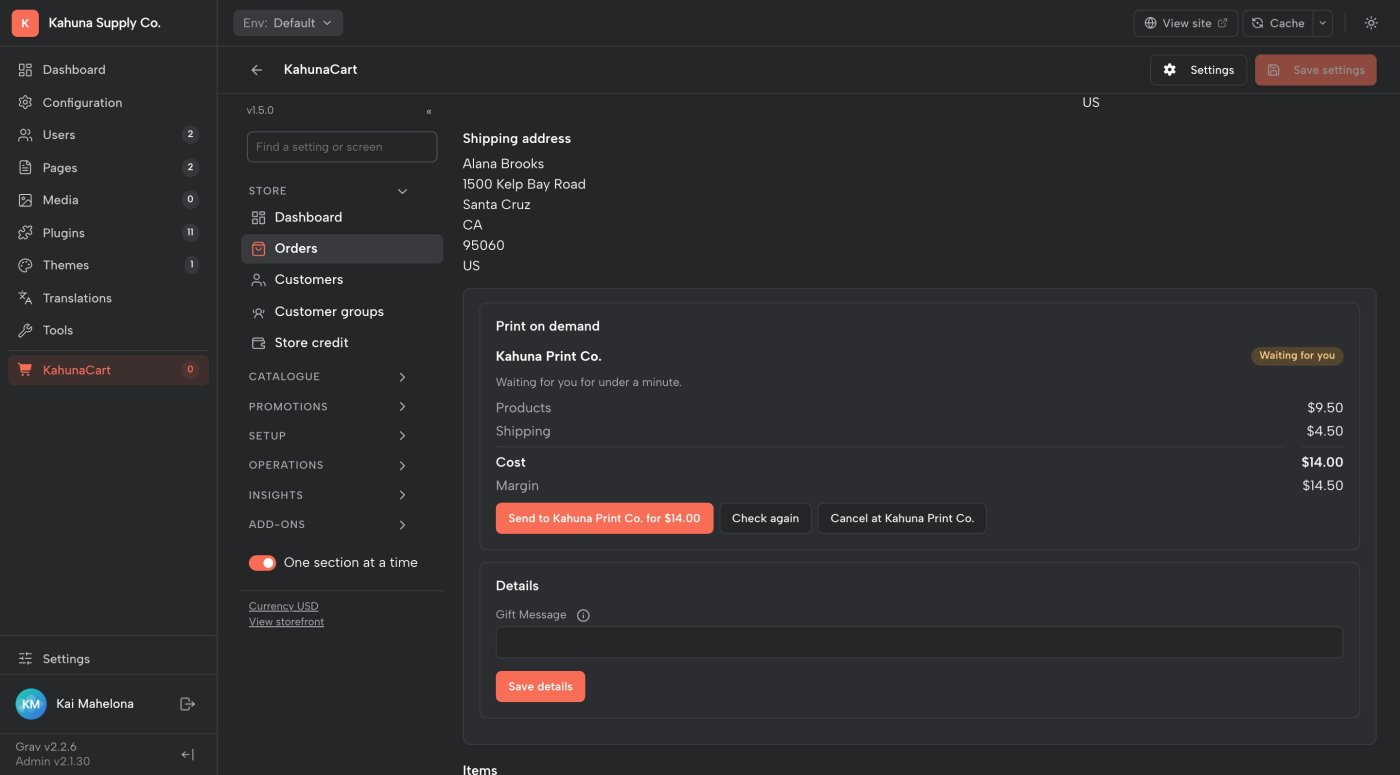
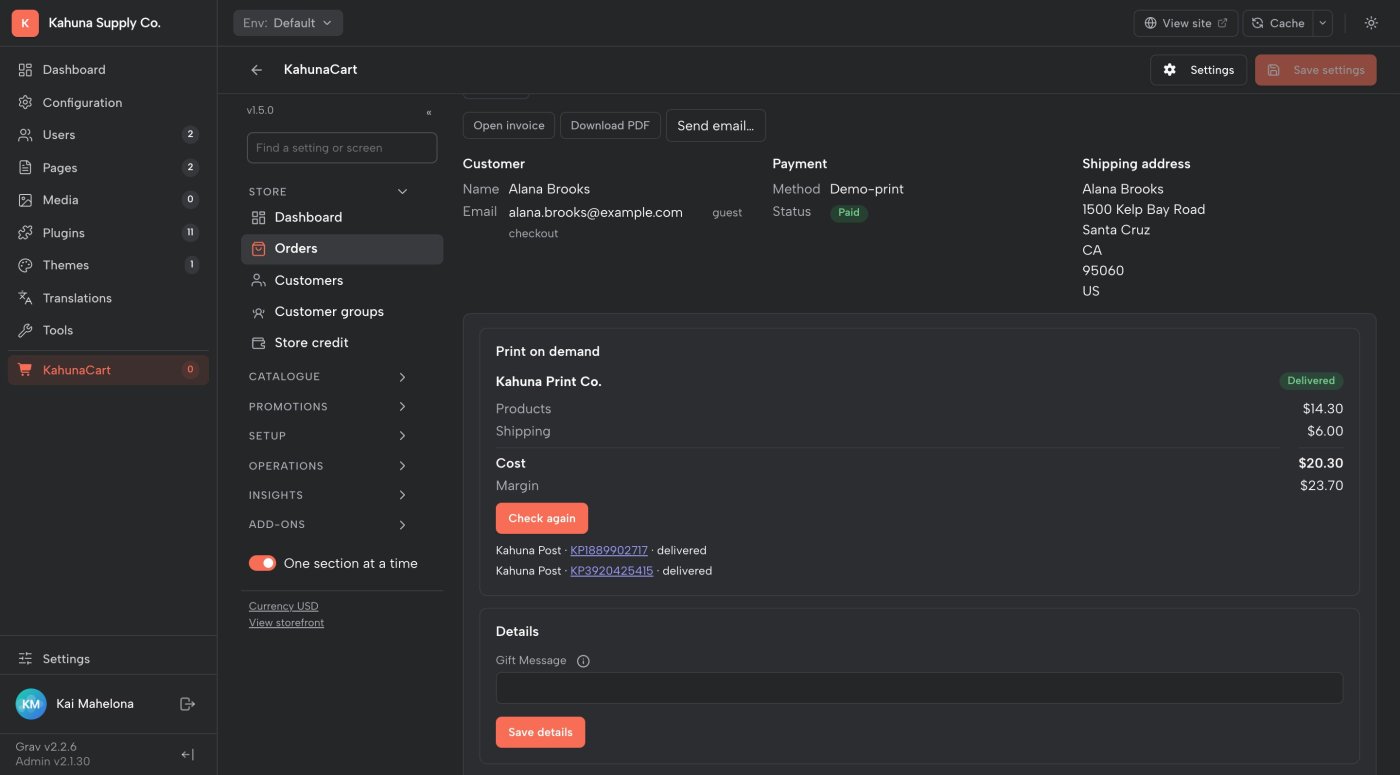
A paid order becomes a free draft at the provider. It waits on the order with its cost and your margin, and goes to production when you press Send.
- The button names the price: Send to Printful for $18.40. Pressing it is when the provider charges you.
- Happy with how it's going? Switch a provider to auto, and paid orders go out by themselves.
- Cancel at the provider from the order. A draft is deleted for free, and an order the printer hasn't started is cancelled.
- A cancelled or refunded sale cancels at the provider by itself.
- The Review tab lists everything waiting for you, and an alert at the top of the admin says how many.
- No doubles
- Every order is looked up at the provider before one is made, so a timeout or a retry never prints twice.
- Checked
- Printify and Gelato orders are read back and compared with your order before they are sent.
- Permissions
- Sending is a permission of its own, separate from setting up the catalogue.
- Reminders
- A daily nudge while orders wait for you, and a note when an order costs more than it brought in.
Docs Orders →
Tracking
Parcels come back on their own
Every parcel the provider sends lands on your order with its carrier, tracking number and link, and your customer gets your store's shipped email.
- The provider tells your store when an order moves. The store also checks every open order every few hours, so a missed message never leaves tracking wrong.
- A partly shipped order shows what has left and what is still being made.
- While items are being printed, the receipt and the customer's account show a short "made for you" note instead of a blank space.
- Checked
- A webhook only tells the store to look. What gets written comes from asking the provider directly.
- Emails
- Your store's own shipped email, from your own address.
- Returns
- Each order links to the provider's dashboard, where returns and reprints are handled.
Docs Tracking →
Questions
Common questions
Do I need an account with a print provider?
Yes. You connect your own Printful, Printify or Gelato account. The provider charges you for each order it makes and for its postage; the add-on doesn't add a fee.
Which provider should I pick?
Printful if you want both imported designs and your own files on its blanks, with the most complete integration. Printify for its wide catalogue and designs you already have there. Gelato for clothing, mugs, wall art and cards printed near the customer, from your own files or a Gelato template. You can connect more than one.
Will an order ever be printed without me?
Not unless you switch that provider to auto. Every provider starts by waiting for you to press Send. For Printify you also set the shop to Manual order approval, because Printify itself prints orders after 24 hours otherwise.
Can I try it before I open an account?
Yes. The add-on has a built-in pretend printer, Kahuna Print Co., with three products, invented postage and orders that move to delivered on a clock. Switch it on for a test store and look around.
Can customers personalise a product?
Not in this release. You sell designs you made, either in the provider's designer or as your own print files.
What do I need to run it?
Grav 2, KahunaCart 1.4.7 or later, the store's job worker running, and a public https address so providers can send tracking updates. See getting started.
Does buying the add-on include printing?
No. Print on Demand is a one-time purchase for your site, with updates covered by your site's single renewal. The printing and postage are charged by your provider. See the store for the add-on price.
Sell what they print.
Buy Print on Demand once for your site. Connect Printful, Printify or Gelato, send orders when you're ready, and follow every parcel from your KahunaCart admin, with updates covered by your site renewal.
Buy in the store