I'm excited to announce KahunaCart 1.6.0! It's a big one, with 49 changes (21 new features, 17 improvements and 11 fixes), and 1.6.1 followed later the same day with one more. The changelog only tells half the story though, because most of my time on this release actually went into themes.
Up until now, if you wanted your store to look different, you had to copy KahunaCart's templates into your theme and edit them there. That's fine until the next release fixes something in checkout and your theme keeps serving its own old copy of the page. Our own Kahuna theme had twelve of these copied templates, and I was going through them by hand every time we released. I really didn't want everyone else who builds a theme to be stuck doing the same thing.
Storefront pages built from blocks
With 1.6, every storefront page is split up into named blocks. That covers checkout, the cart, the product page, the order page, product listings, categories and search. Each region of a page gets its own block, and a layout block on each page arranges those regions into columns. Your theme's checkout template now just extends KahunaCart's and overrides the blocks you actually want to change. Everything else still comes from KahunaCart, so when we fix something in a later release, your store picks it up without you touching the theme.
The little pieces that show up all over the store have moved into their own files too: the product card, the cart line, the receipt line and the delivery method. Change the product card once and every card in the store follows, even the ones the filters load in on the fly.
Themes also get some new settings (type, card shadows, the gap between cards, the focus ring, and the size card pictures get cropped to), plus a handful of helpers for things a theme used to have to figure out on its own:
- Whether a product card can add straight to the cart
- A category's picture at any size
- A product's releases and a pre-order's date
- A customer's downloads
If you've already got a theme with copied templates, don't worry. It still works exactly like it did before.
If you build themes, check out Theme blocks for the full list. There's a test in KahunaCart that checks that list against the actual templates, so it won't drift out of date.
Three free themes
Once the blocks were in place, we built three themes on them, and all three are free with every KahunaCart license:
- Kahuna is the warm, friendly theme you've seen on the demo store, rebuilt on blocks.
- Slate is crisp and square, with sharp lines and plenty of white space.
- Pebble is soft and rounded, with pill buttons and gentle shadows.
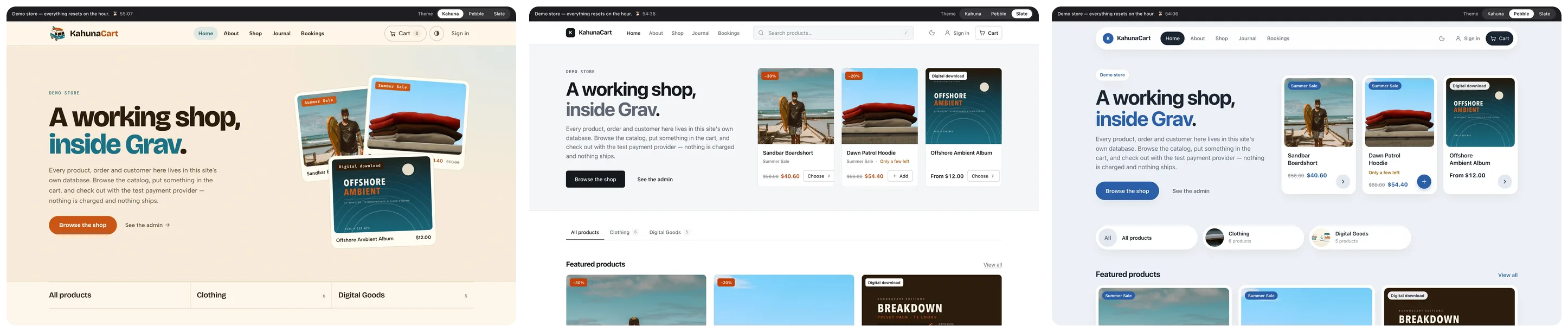
Each one has full light and dark designs, and they come with the extra pages a real shop needs: a home page, an about page, a journal and bookings. Install them from the admin with the license key you already have, or from the command line with bin/gpm install slate. You don't need to buy anything, and you can switch between them whenever you feel like it.
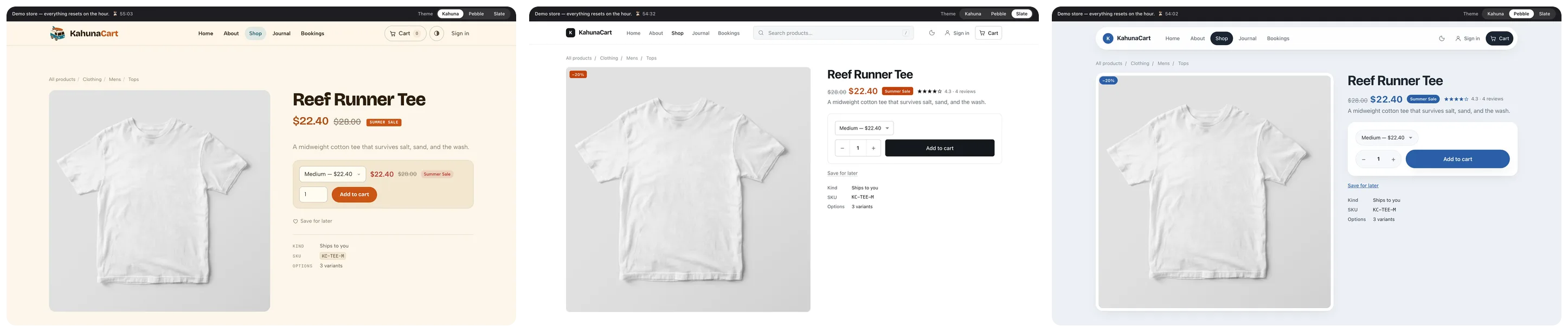
Here's the same product page in all three. Slate and Pebble don't copy a single KahunaCart template to get there, they just extend them. Pretty cool, right?
Home pages made of modules
The home and about pages in every theme are now built from modules. That's things like a hero, a row of categories, featured products, a band of text with a picture, and whatever else the theme offers. You add them in the admin, drag them into the order you want and switch them off when you don't need them, with picture and icon pickers where they make sense. No more editing a template just to move a section around.
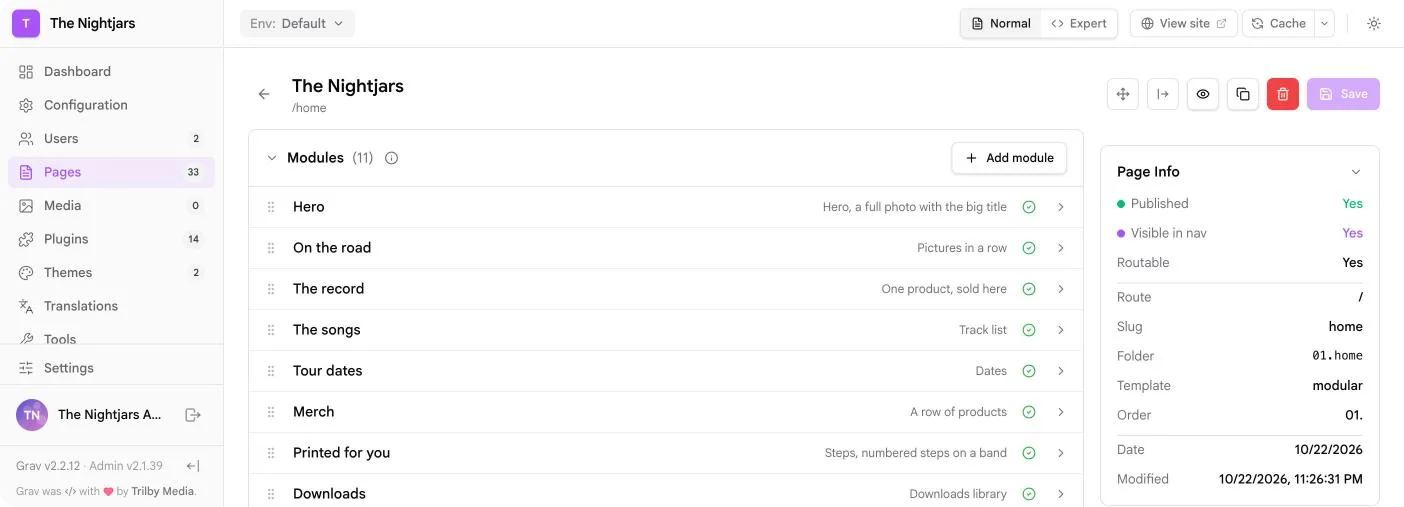
The module list in the page editor is new in Admin 2.1.40 and API 1.0.57, which went out this week as well. They also bring icon sets, so a theme can put its own icons in the icon picker.
Six business themes
Building the free themes on blocks went so smoothly that we just kept going, and ended up with six business themes. Each demo is set up as an example business with its own photography, fonts and colors, and a home page that puts its add-on to work right there on the page, so you can try it the way a visitor would.
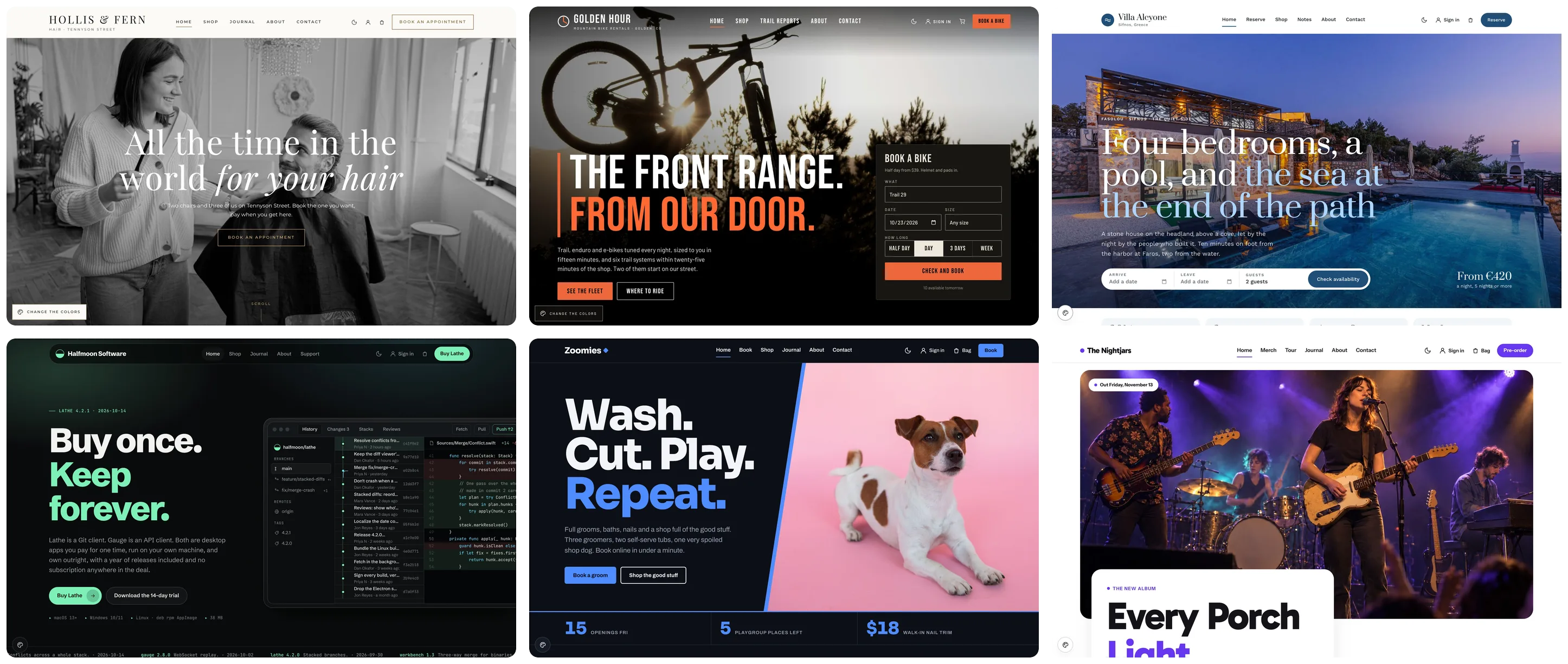
- Vellum is calm and photo-led, with black and white photo bands. Its demo is a hair salon taking bookings for cuts and color.
- Boulder is dark and loud, with big type and a booking panel right over the hero. Its demo rents out mountain bikes by the half day, and sells them too.
- Aegean is big photos and calm serif type, with a date picker on the home page. Its demo is a holiday house taking nightly stays.
- Graphene is dark with a mint accent and a terminal-style changelog. Its demo is a software studio selling apps with license keys.
- Zoom is bright and fun, all electric blue, with the day laid out in lanes. Its demo is a pet shop that does grooming.
- Encore is colorful and joyful, with a preview player and the tour dates on the home page. Its demo is a band selling records, downloads and printed-to-order shirts.
Those businesses are only examples though, and nothing in a theme ties it to the one in its demo. Vellum would work just as well for a florist or a studio, and Encore suits anyone with records, merch and dates to sell. Swap in your own words, pictures and colors. Every demo has a color panel, so you can try a few out before you buy.
Each business theme is $99, a one-time purchase that goes onto your KahunaCart license key just like any other add-on, and updates are included with your site renewal. If you don't already have the add-ons a demo uses, there's a bundle for each one for more savings:
- Vellum + Bookings, Boulder + Bookings and Zoom + Bookings: $209 each
- Aegean + Bookings + Rentals: $279
- Graphene + License Keys: $189
- Encore + Print on Demand + Newsletters: $319
- All six business themes: $399
Every theme installs through the Grav package manager with your key, but you can also grab each one as a ready-to-run store. That's a complete Grav site with the theme, KahunaCart and the store setup from its demo (the catalog, services, staff, hours and rates), minus the demo's customers and orders. Your key gets written into the package when you download it, and you'll find them in the Downloads tab of your KahunaCart account.
The packages are also a great way to learn how to set up KahunaCart. Open one up and you can see exactly how its products, options and pages are put together. And if you'd rather not start from scratch, it's a good place to begin.
If your key doesn't cover one of the add-ons a demo uses, that add-on is left out of your package. Any module that needs it will tell you it's missing, and you can install the add-on later or just switch that module off.
New demos
We've also rebuilt demo.kahunacart.com from scratch. It now opens on a landing page that lists every demo, with notes at each stop on what to try and how to sign in.
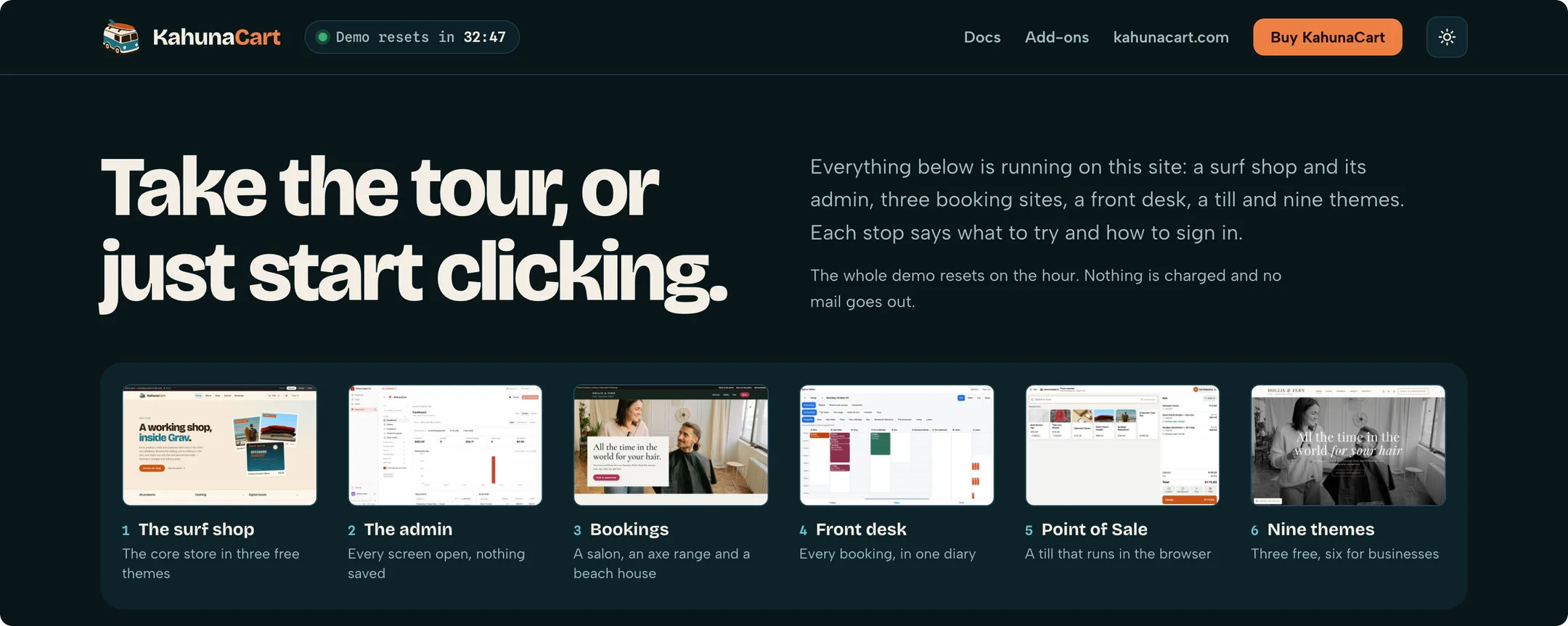
- The surf shop is still our core demo store, now living at /store, with a bar across the top that lets you flip between Kahuna, Slate and Pebble as you browse.
- The admin lets you open every screen, and nothing you change gets saved.
- Bookings, the front desk and Point of Sale each get a demo of their own.
- Each business theme has its own complete demo store: /vellum, /boulder, /aegean, /graphene, /zoom and /encore. Book a haircut, rent a bike or pre-order a record.
The whole site resets every hour, nothing is charged and no emails go out, so go ahead and click on anything you like.
Also in 1.6
A couple of these came straight out of building Encore. A band wants to sell a record as an LP, a CD and a download, and it wants to start selling before the release date. KahunaCart couldn't do either of those before. Now it can.
Pre-orders. Give a product an Out on date and it sells as a pre-order until that day. The button changes to Pre-order with the date beside it, and the cart, receipt and emails all say when it's out. Payment and stock work the way they always have, so a limited pressing can still sell out. Download links are handed out at purchase but only open on release day, and on the day every waiting buyer gets an "It's out" email with their links. After that it's an ordinary product again, and you don't have to change a thing. See Pre-orders.
Digital variants. Tick Digital on any variant of a physical product and that variant won't ship anything or ask for an address. So a record in amber vinyl, black vinyl, CD, cassette and download can finally be one product. Physical products can carry files now too, which means you can give every LP buyer the download, or only the buyers of one variant. See Digital variants.
Whole Amounts. Flip one switch and the storefront shows $55 instead of $55.00. Prices with cents keep them, and prices shown side by side always use the same format, so you'll never get $55.00 sitting next to $49. Invoices, emails and reports still show full amounts.
Cart, bag or basket. Pick the word your shop uses and every shopper-facing string follows along, from the buy button right through to "Your bag is empty."
Coupons from an ad. Put an ad's campaign tag on a coupon and anyone who arrives from that ad gets the code applied for them. You don't have to edit an ad that's already running and send it back through review just to add a code. See Codes that apply from an ad campaign.
And a bunch of smaller goodies:
- Gotify notifications for store owners who run their own Gotify server, and the channel picker is now a set of cards.
- Account tabs are hidden when a customer has nothing in them, so someone buying from a software store doesn't see an empty Bookings tab.
- Rating a product is now a row of stars that light up as you pick, and it still works from the keyboard.
- Dates shoppers see follow your store's language: month first in US English, day first in British English.
- Deposits are clear from the bag right through to the invoice, showing what's due today, what's left and when it's due.
- Payment methods and collection points show as cards at checkout, and picking a collection point hides the delivery methods.
- 1.6.1 adds review stars to product cards for any theme that wants them, using your approved reviews. Zoom already shows them.
Add-ons
- Subscriptions 1.1.10, Bookings 1.1.12 and Licenses hide their account tabs when a customer has nothing in them. Bookings and Rentals 1.0.8 also fill in a signed-in customer's name, email and phone on the booking form.
- Licenses 1.1.4 writes the right key into a theme's ready-to-run package, and leaves out any add-on that key doesn't cover.
- Every add-on now ships with its own
LICENSEfile and links to the KahunaCart License.
Update from the admin or with bin/gpm update, then give Slate or Pebble a spin on your own store. I'd love to see what you build with the blocks, so come and show me on Discord!
— Andy